
A bigger accessibility menu for shoppers
An accessibility widget only helps if it has the tool a shopper needs. The EA Accessibility menu now covers more needs, and it is on for every store, with no setup:
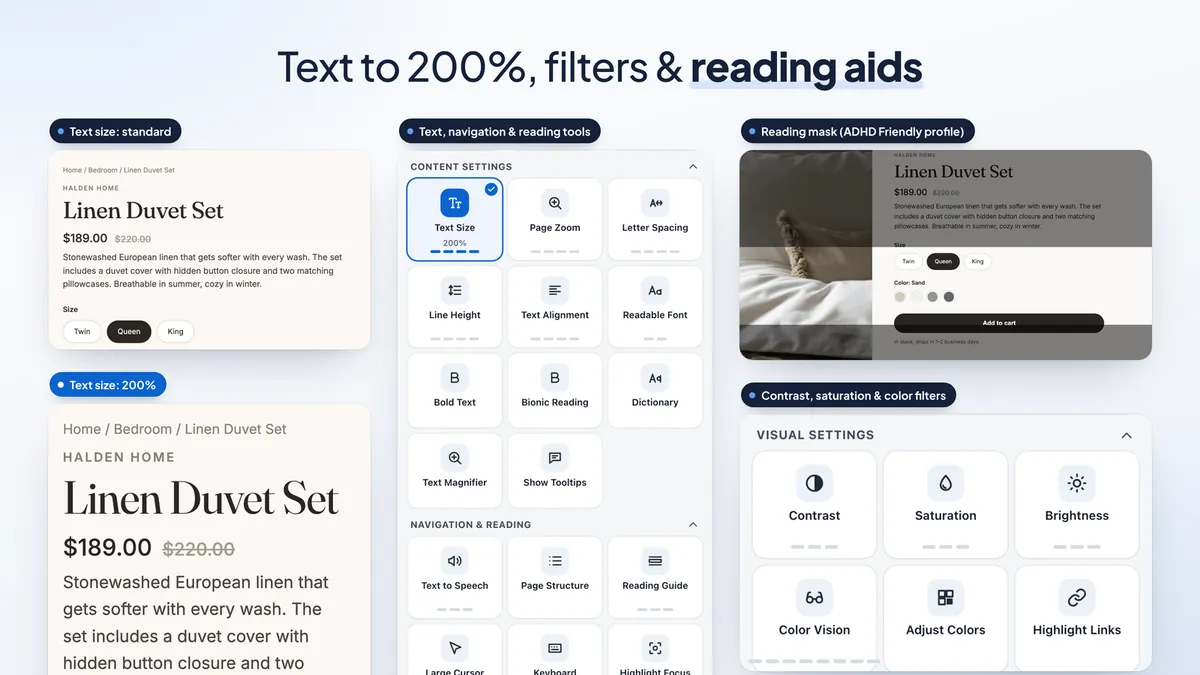
- Text size up to 200%, so shoppers with low vision can read product details without zooming the whole browser.
- Page zoom from 150% to 400% for shoppers who need everything larger.
- Eight color filters in Color Vision, and a Color Blindness profile that switches on a red-green filter.
- A Screen Reader profile with voice settings: voice, speed, pitch and volume.
- Voice commands in the shopper's own language.
- Bionic reading, a dictionary and bigger checkboxes for easier reading and tapping.
- Hide videos and pause GIFs for shoppers who are distracted or bothered by motion.
- A "Translate page" tile when your store also runs EA AI Language Translate.
With Plus you can also choose which tools show, so the menu is quicker to scan, and build up to 6 profiles of your own, each with a name and the tools it turns on.
A lighter widget that loads when it's needed
Most shoppers never open an accessibility menu, so they shouldn't pay for it in load time. The accessibility button now comes from a small script under 10 KB. The full menu loads only when a shopper hovers over the button, clicks it or uses its keyboard shortcut.
The menu is also lighter on big pages. The setup behind text size, letter spacing and line height now runs only when a shopper turns one of those options on, not for every visitor on every page load.
There is also an Accessibility link theme block: a text link or a badge you can place in your theme that opens the menu.
Store scans with plain-English fixes
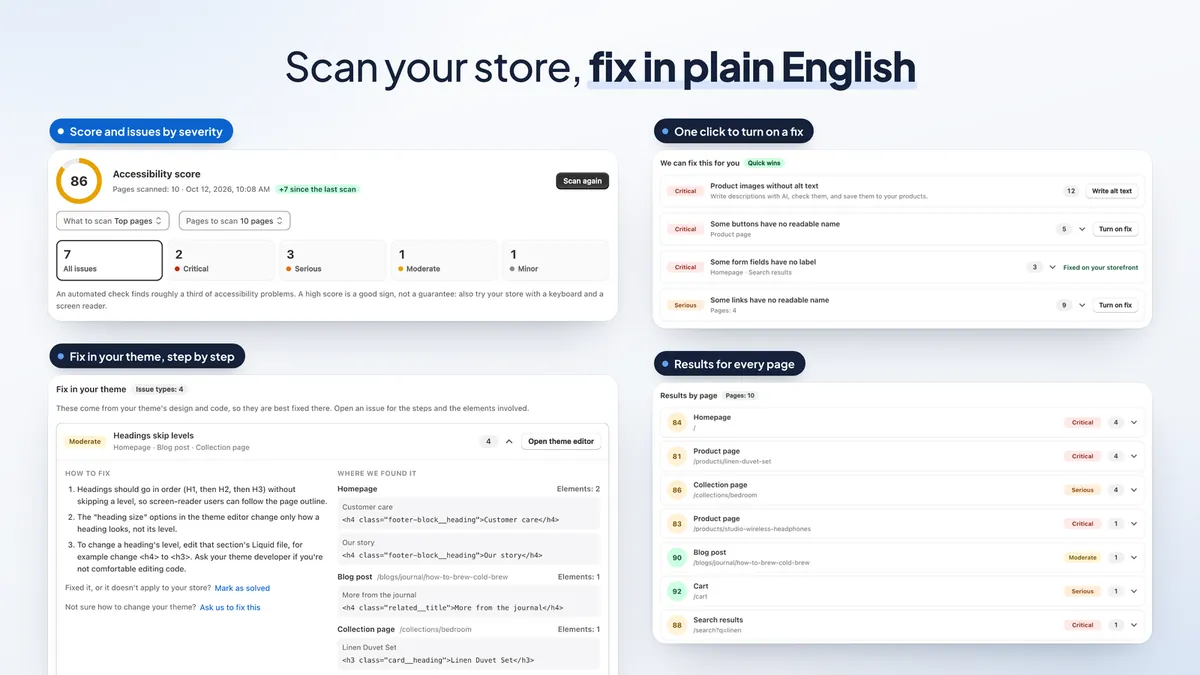
The store scan checks your pages for common accessibility issues, such as missing alt text, low contrast and unnamed buttons. It gives you a score, sorts issues by how serious they are and explains each fix in plain English. New this month:
- Choose what to scan: your top pages, your whole store, one group (products, collections, pages or blog posts) or a single URL.
- Password-protected stores get a basic check, so you can scan before you launch.
- Unpublished themes can be scanned before you publish them.
- Mark as solved clears an issue you have fixed. It comes back if a later scan finds more.
- A Fix button on issues the app can help with takes you to the right fix.
Free stores get one scan of up to 5 top pages that shows how many issues it found. Plus scans up to 50 pages whenever you like and shows every issue with its fix steps. Remember that automated tools find only some issues, so manual review with a keyboard and a screen reader is still needed. Our WCAG 2.1 AA checklist covers what a scan can't.
Opt-in storefront fixes and AI alt text (Plus)
Some issues come from your theme and take a developer to fix. Storefront fixes handle many common ones after each page loads, without changing your theme files: unnamed buttons and links, missing form labels and image alt text, a skip link, a clear focus outline, page landmarks, duplicate IDs and autoplaying media. Each fix is opt-in, and you can turn each one off.
Product photos without alt text are one of the most common scan issues. With Plus, AI writes short alt text for up to 500 product images a month, and new product images can get alt text written for them automatically. AI is only for you in the admin. Shoppers never use or see it. For more on alt text and image SEO, see our image optimization guide.
Monitoring, alerts and reports (Plus)
A theme or app update can add a new issue without you noticing. With monitoring, your store is scanned again every day or every week. You get an email when a new serious or critical issue appears, or when a known issue gets clearly worse.
You can download your results as a PDF or CSV report, with your score over time, results by page and fix steps. Each check lists the WCAG success criterion it relates to, which makes the report easy to share with your team or developer.
Statement page and shopper reports (Plus)
An accessibility statement tells shoppers what you are working on and how to reach you. The statement editor builds the page from a few details: a WCAG 2.1 AA or 2.2 AA target worded as a goal, a feedback email, a date and a privacy note. If you like, a short factual section is updated after each scan, and the statement can open right inside the menu.
The Report a problem form lets shoppers tell you what got in their way, right from the menu, in 32 languages. They pick a category, describe the problem and can add the assistive technology they use and an email. Reports land on the Shopper reports page in the app. You can also get an email for each report or one summary a day, and an AI summary puts the most common problems first. For tips on accessible forms in your own theme, see our forms guide.
An easier admin, in your language
The admin now has a clearer menu: Home, Widget, Scan & fixes, Shopper reports, Plan and Help. Scan & fixes groups everything in tabs: Issues, Storefront fixes, Alt text, Monitoring & reports and History.
- The admin is available in 32 languages, and numbers and prices follow your admin language's format.
- On Plus, the AI assistant can change settings and start a scan from a request in plain words, and confirm several steps with one click.
- On Plus, Shopify Sidekick can answer questions about your latest scan.
Plans and pricing
Free: the accessibility menu with every shopper tool, the menu in 32 languages, and one free store scan of up to 5 top pages that shows how many issues it found.
Plus, $9.99/month with a 7-day free trial: everything in Free, plus store scans of up to 50 pages with every issue and its fix steps, automatic storefront fixes, AI alt text for 500 images a month, the statement page, the Report a problem form, monitoring alerts and PDF/CSV reports, custom CSS, your own profiles and wording, choosing which tools show, and showing the menu only on the pages or in the countries you choose.
Larger stores can choose Pro ($49.99/month) for 100-page scans or Business ($99.99/month) for 200-page scans. See every feature and plan on the EA Accessibility page.
How to get started
- Install EA Accessibility from the Shopify App Store.
- Turn on the app embed in your theme so the accessibility button shows on your store.
- On the Widget page, set the button's position and look.
- Run your free store scan from Scan & fixes to see how many issues your top pages have.
- Start the 7-day free trial when you want every issue with fix steps, storefront fixes and AI alt text.
New to accessibility? Start with our guide to making your Shopify store accessible and the Shopify accessibility checklist. Selling in Europe? Read our European Accessibility Act guide.
💡 Ready to put this into practice? Shopify's free 3-day trial — then $1/month for 3 months, plus 1% of sales back in credits — is long enough to set it up and see the numbers. Start your free trial → (affiliate link)
Frequently Asked Questions
Is EA Accessibility free?
Yes. The free plan includes the accessibility menu with every shopper tool, the menu in 32 languages and one free store scan of up to 5 of your top pages that shows how many issues it found. Plus costs $9.99 a month with a 7-day free trial and adds scans of up to 50 pages with every issue and its fix steps, automatic storefront fixes, AI alt text, the statement page, the Report a problem form, monitoring and PDF reports.
Is an accessibility widget enough for ADA, WCAG or the EAA?
No tool can do that on its own. EA Accessibility supports your WCAG, ADA and EAA work: it gives shoppers tools to adjust the page, scans for common issues, explains fixes and offers opt-in fixes. Automated checks find only some issues, so test your store with a keyboard and a screen reader too, and review it by hand.
Will the accessibility widget slow down my store?
The widget is built to stay light. The button comes from a small script under 10 KB, and the full menu loads only when a shopper opens it or hovers over the button. The text-size setup runs only when a shopper turns on a text option, so it does not run for ordinary visitors on large pages.
Can I scan a password-protected store or a theme I have not published yet?
Yes. A password-protected store gets a basic check, and you can pick an unpublished theme to scan before you publish it.
Do shoppers ever use AI in the menu?
No. AI in EA Accessibility is only for you in the admin, for example to write alt text for product images or to change settings with the AI assistant. AI features are part of the paid plans.
Make your store easier for every shopper
Add the accessibility menu for free and run your first store scan. See every feature and plan.
Install Free on Shopify