
Every kind of signup popup
One app covers the popups a Shopify store usually needs, so you don't have to run several:
- Email and SMS popups that collect an email address, a phone number or both, with consent saved on the Shopify customer.
- Newsletter and discount popups that give every new subscriber a unique discount code.
- Quiz popups that ask a question or two before the form.
- Information popups with no form, and age check popups for stores that need one.
- Game popups: spin the wheel, scratch card, mystery box, slot machine and Plinko, for stores that want signing up to feel like a prize draw.
The rest of this post covers what is new across all of them.
Ask a question, give the right offer
A plain email popup asks every shopper for the same thing. Question steps let your popup learn something first, so the offer fits the person.
- Up to 4 question steps before the form. Use yes/no or multiple-choice questions, such as "Who are you shopping for?". Answers are saved on the Shopify customer.
- Answer-based offers. Give each answer its own prizes and its own success message. A shopper buying a gift can win something different from a shopper buying for themselves.
- Answer actions. An answer can skip ahead to a later step, show its own button and link after sign-up, or change the products shown on the success screen.
- One Question popups with a Continue, Go to or Close action per answer, and answer buttons in pill, outline, card or filled styles.
- Information popups with no form at all, for a shipping notice, a new arrival or a code to copy.
- Age verification. Ask a simple yes/no or a date of birth, and remember the answer for as many days as you choose.
If you want ideas for questions that lead to better offers, our quiz marketing guide is a good place to start.
Popup, inline form or signup page
You can now choose where a campaign appears and exactly when it opens.
- Inline signup form. Add the EA signup form app block anywhere in your theme, for example as a footer newsletter. Set Show as to Popup, Inline form or Both. The new Footer Newsletter template is built for this.
- Signup page link. Every campaign can have its own page on your store, so you can share the offer anywhere you post a link.
- More triggers. Open the popup after a shopper is idle, after an add to cart, after a number of pages, or on a click. Choose whether any one trigger is enough or all must happen, or open a campaign from your own link or button.
- Sharper targeting. Show a campaign only on products with certain tags, and hide it from your own IP address with one click.
- Polite by design. Stop showing a campaign after a shopper closes it a set number of times, and let a popup wait until other popups have closed.
Timing still matters most for a discount popup. See our guide to exit intent offers on Shopify for when to show yours.
More ways to set up prizes and codes
Every sign-up still gets its own unique discount code, and the prizes behind those codes are now more flexible.
- Prize limits. Limit how many codes for a prize can be used, and show an optional "Only X prizes left!" line.
- Free gift choice. A winner picks the size or color of a free gift and adds it straight to the cart.
- Prizes without a code. Offer something like a free styling session, with your own message and button.
- Subscription prizes. On stores that sell subscriptions, choose whether a code works on one-time purchases, subscriptions or both.
- Code tools. Set codes to expire on a fixed date, limit free shipping prizes to chosen countries, look up any code, and clean up expired codes nobody used.
- Tags and automations. Tag customers who win a prize, tag customers who use their code, and start a Shopify Flow when a code is redeemed.
- Products in the code email. Add up to 4 product cards to the discount code email.
Games, templates and design
Games are one way to make signing up feel like a reward. Spin the wheel, scratch card, mystery box, slot machine and Plinko all got a fresh look.
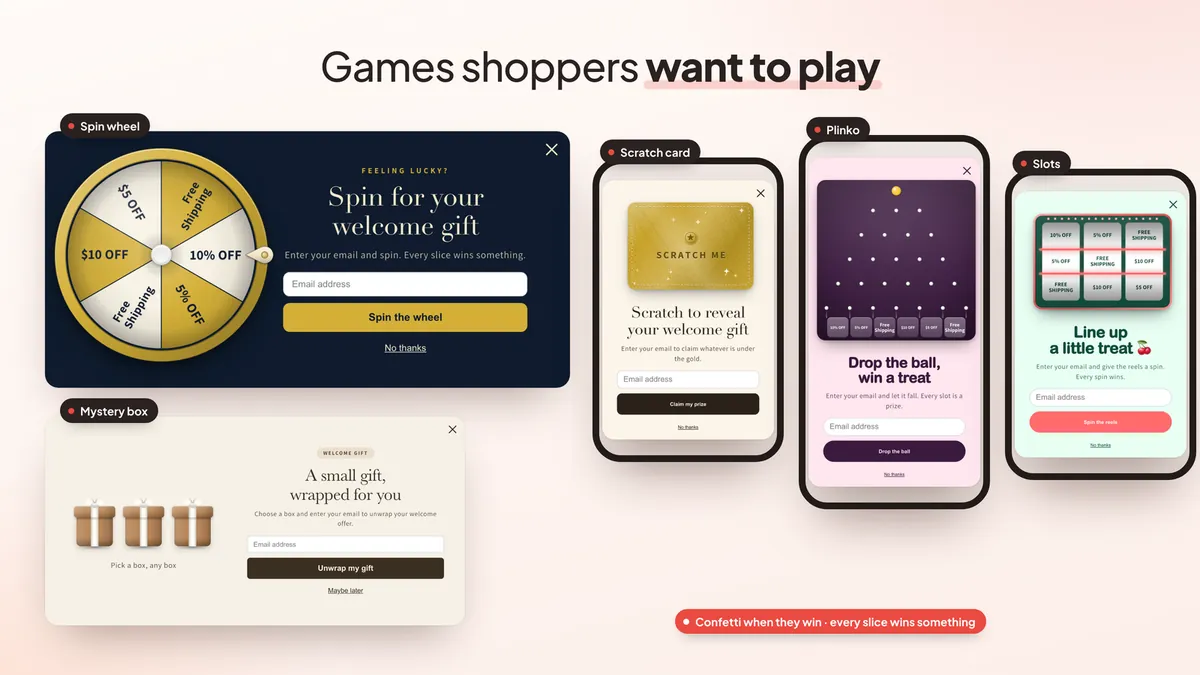
- Playful wheel options. Make some slices bigger than others (the odds stay the same), pick a quick, slow or dramatic spin, and turn on spin sounds.
- Scratch card, slot machine and Plinko now all use the Playful look.
- Popup look. Separate images for phones, gradient backgrounds and entrance animations: slide up, slide down, zoom or bounce.
- 98 templates for seasons, store types, every game, quizzes and notices. The best ones carry a "Top performer" badge.
- Social proof. Show real recent winners or recent orders, with names masked.
- Invite a friend. A winner shares a link, and when a friend visits, the winner gets another spin.
- Social follow step that asks shoppers to follow you before they continue.
Email and SMS tools
Sign-ups are saved as Shopify customers, and they now reach more tools with more detail.
- Integrations: Klaviyo, Omnisend, Mailchimp, ActiveCampaign, Postscript, Attentive and Brevo, plus up to 3 webhooks for any other tool.
- Richer data. Quiz answers, the prize won, the code and its expiry, and the traffic source travel with each contact. In Klaviyo, prize winners and answers can join their own lists.
- Preview what each tool receives, send existing subscribers to an email tool, and import subscribers from a CSV file.
- More form fields: dropdown, number, date, long text and switch.
- Continue with Shop lets shoppers that Shop recognizes sign up in one tap.
- Phone numbers and consent. Make the SMS popup phone step required, and show the consent checkbox only where a privacy banner is needed.
Setting up texting? Read our SMS popup integration guide.
A/B tests and analytics
A/B tests could already compare designs and pick a winner. They now go further.
- Test rules and prizes. Compare triggers, delay, pages and how often a popup shows, or test one prize table against another. Rules tests compare sign-ups per visitor.
- Better results. See discounts given and revenue per visitor, and set an end date for a test.
- Breakdown report. Sign-ups, orders and revenue by answer, prize, traffic source, device, placement and country.
- Subscriber revenue for the 30, 60 and 90 days after sign-up, plus an Insights card with tips for your store.
- Analytics events for Google Analytics, Google Tag Manager and the Meta pixel, off until you turn them on.
Need test ideas? Try our popup A/B test ideas.
AI help and an admin in your language
- AI campaign plans (paid plans). Ask the assistant for several campaigns at once, such as Halloween and Christmas, with dates and themed prizes. You confirm the plan before anything changes.
- Brand rules (paid plans). Tell the AI the largest discount it may suggest.
- Suggest with AI (paid plans) fills in A/B test ideas for you.
- 32 admin languages. Dates, numbers and money show in your language, in your store currency.
The AI tools work in your admin only. Shoppers never use or see them.
Plans and pricing
EA Email Popup & Spin Wheel is free up to 1,000 store pageviews a month, with the games, quizzes, A/B tests and discount code emails. Above that, pricing is usage-based and follows your pageviews:
- Starter: $4.99 a month, up to 2,000 store pageviews.
- Premium: $14.99 a month, up to 5,000 store pageviews.
- Professional: $29.99 a month, up to 10,000 store pageviews.
Higher tiers for bigger stores are shown in the app. Every paid tier starts with a 7-day free trial, and the AI tools need a paid plan. Full details are on the EA Email Popup & Spin Wheel page.
How to get started
- Install EA Email Popup & Spin Wheel from the Shopify App Store.
- Turn on the app embed in your theme editor.
- Create a campaign from a template, then add a question step and answer-based offers if you want them.
- Connect your email or SMS tool in Rules > After signup > Integrations.
- Turn the campaign on, then start an A/B test once traffic comes in.
New to spin wheels? Our step-by-step guide on how to add a spin wheel popup to Shopify walks through every screen.
💡 Ready to put this into practice? Shopify's free 3-day trial — then $1/month for 3 months, plus 1% of sales back in credits — is long enough to set it up and see the numbers. Start your free trial → (affiliate link)
Frequently Asked Questions
What kinds of popups can I make with EA Email Popup & Spin Wheel?
Email and SMS signup popups, newsletter and discount popups, quiz popups with questions before the form, information popups with no form, age check popups, and game popups: spin the wheel, scratch card, mystery box, slot machine and Plinko. Each can show as a popup, as an inline form in your theme, or on its own signup page.
Is EA Email Popup & Spin Wheel free?
Yes. It is free up to 1,000 store pageviews a month, with the games, quizzes, A/B tests and discount code emails included. Above that, pricing follows your pageviews: $4.99 a month up to 2,000, $14.99 up to 5,000 and $29.99 up to 10,000, with higher tiers in the app. Paid tiers start with a 7-day free trial. The AI tools need a paid plan.
Can I give a different discount depending on a shopper's answer?
Yes. Add a question step before the form, turn on Answer-based offers and choose the prizes and success message for each answer. The prize is drawn from that answer's prizes only.
Can I show the signup form in my footer instead of a popup?
Yes. In Rules > Where it shows, set Show as to Inline form or Both, then add the EA signup form app block in the theme editor. The Footer Newsletter template is made for this. Each campaign can also get its own signup page link.
Which email and SMS tools does it sync with?
Sign-ups are saved as Shopify customers and can sync to Klaviyo, Omnisend, Mailchimp, ActiveCampaign, Postscript, Attentive and Brevo, or to any tool through a webhook. Quiz answers, the prize won and the discount code are sent along.
Can I A/B test when the popup shows, not only how it looks?
Yes. A/B tests now cover the rules (triggers, delay, pages and how often it shows) and the prizes, not only the design. Rules tests compare sign-ups per visitor.
Do shoppers ever talk to the AI?
No. The AI assistant lives in your admin only. It helps you build and edit campaigns. Shoppers only see the popup you publish.
Try the new email popups free
Grow your email and SMS list with games and questions shoppers enjoy, free up to 1,000 store pageviews a month. See every feature and plan.
Install Free on Shopify