
What's new in all four bar apps
A bar at the top of the page is one of the simplest ways to show a free shipping goal, a sale or a deadline. We make four free bar apps for Shopify, and they now share the same engine and admin. Every one of them gets:
- Lighter on your store. The bars run on a new, smaller storefront script. On pages with no active bar, the app adds no script at all.
- Results for every bar. See how each bar performs, from views and clicks to the orders it helped.
- A/B tests. Test two versions and compare them. In the rewards, announcement and countdown apps, the app can also pick the winner for you once there is enough data.
- Visitor targeting. Show a bar to chosen customers, tags, markets or collections, after a delay, on the pages you pick.
- A simpler admin. A home page with a setup guide and your bars, and an editor with one live preview for desktop and phone. Start any bar from a template.
- Your language. The admin is available in 32 languages, with money and numbers written the way your language writes them, in your store currency.
Free shipping bar: goals that apply at checkout
EA Free Shipping Bar & Upsell shows shoppers how close they are to free shipping. The biggest change: the app can now create the free shipping discount for you, so Shopify applies free shipping at checkout once a cart reaches the goal. No code needed. It is on by default for new bars.
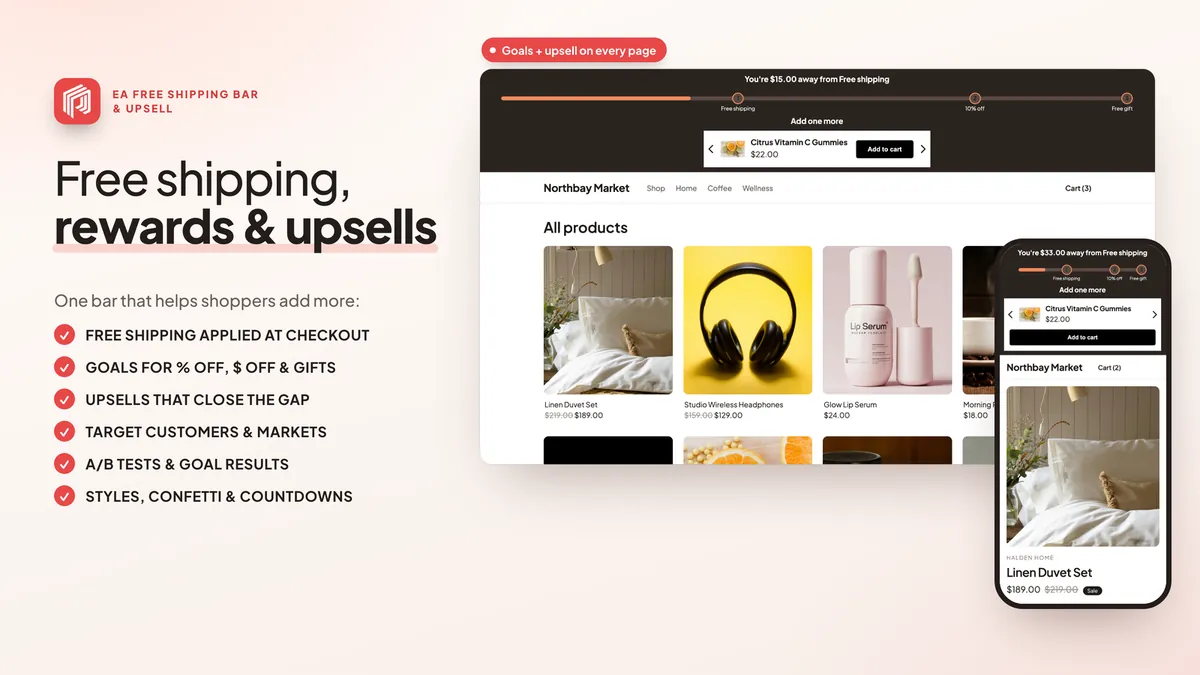
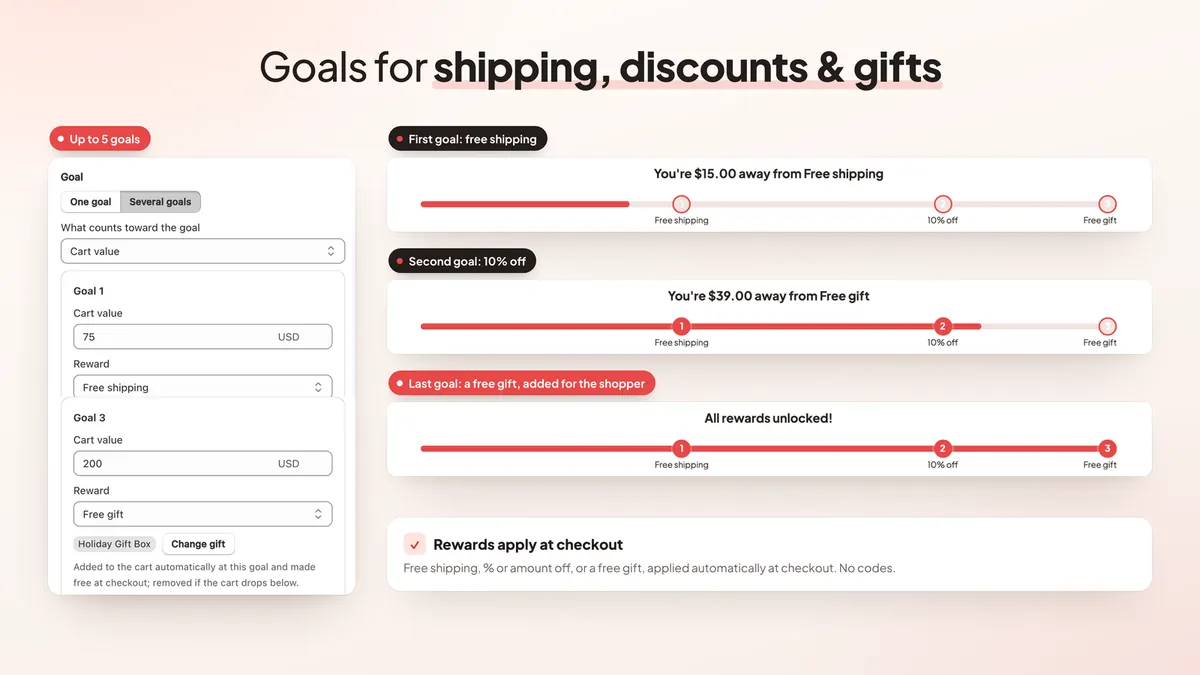
- Up to 5 goals. Add steps for free shipping, a percentage off, an amount off or a free gift. Goals can count cart value or item count and can leave out gift cards or chosen products. Drag goals to change their order.
- A goal per currency. Set your own goal for each currency, or let converted goals round to clean numbers.
- Upsells that close the gap. Suggest products from a collection, show the ones that reach the goal first, and hide upsells once the goal is met. Upsells with a subscription option can show a "Subscribe & save" checkbox.
- Setup wizard. On first run, the wizard suggests a free shipping goal a little above your average order value, once your store has 10 or more orders.
- Styles and placement. Glow, stripes and percentage styles, confetti when a goal is reached, and background patterns. Show the bar above or below the add to cart button, or inside several popular third-party cart drawers.
- Goal results and A/B tests. A Goal results card shows how your goals perform, and you can test two goals against each other.
Not sure where to set your goal? Read how to set the perfect free shipping threshold, or follow how to add a free shipping bar to Shopify.
Rewards bar: free gifts and cart goals
EA Rewards Bar & Free Gifts is a cart progress bar with several rewards that unlock as the cart grows. It is built for gift with purchase offers: the gift is added to the cart for the shopper and is free at checkout. (See it on the Shopify App Store.)
- Up to 6 reward tiers. Free shipping, money off and gifts, with more than one gift per tier. Stack every unlocked reward, or give only the highest.
- Eligible products. Choose which products or collections count toward the goals, for example to leave out gift cards or sale items. The bar and the discount at checkout both use only the eligible amount.
- Buy X, get a free gift. Add a free gift when a shopper buys a chosen product, on top of the cart goals.
- Better free gifts. A message when a gift is added, a "No thanks" choice in the gift picker, backup gifts when the first choice is out of stock, and a gift note on product pages. You can also offer a gift at a fixed price.
- In the cart, too. Show the bar in the cart drawer, or add it to the cart page as a theme block.
- Program rules. Run rewards between set dates, in chosen countries, for chosen customers or tags, or on a first order only. Discount codes can unlock a tier, and you choose whether rewards combine with other discounts.
- Checkout rules. Add an optional rule in your checkout settings that stops orders with only free gifts, or limits how many gifts an order can have.
- Test before you launch. A private test link lets you try draft rewards on your live store before shoppers see them.
- Reward results. See what rewards cost, average order value with and without rewards, and the most-chosen gifts. A/B test reward amounts.
- New looks. A line, cards or a ring, gradient or striped fills, confetti and your own tier icons.
New to gift offers? Our free gift with purchase guide covers the basics.
Announcement bar: templates, discounts and signups
EA Announcement Bar Banner puts a sale, a code or a shipping message at the top or bottom of every page. (See it on the Shopify App Store.)
- 25 templates and a full design kit. 37 icons, 10 patterns, your own background image and 40 Google Fonts.
- A real scrolling banner. A continuous scrolling ticker (marquee), plus a compact phone layout with a shorter title for small screens.
- Create discounts in the app. Make a Shopify discount for a bar, such as a code, buy X get Y, free shipping or a tiered discount, without leaving the editor.
- Email signup bar. Collect emails in the bar. Sign-ups go through Shopify's own customer signup form.
- Cookie notice bar. Show a cookie consent notice bar built on Shopify's Customer Privacy API.
- Live text. Put a countdown, the amount left to a goal or the cart total inside the message.
- More places. Show bars in the cart drawer, above collections or as a theme block.
For message ideas, see how to add an announcement bar to Shopify.
Countdown timer: sales countdowns and launches
EA Countdown Timer Bar adds urgency with a sales countdown that matches your store. (See it on the Shopify App Store.)
- Per-visitor timers. Each shopper gets their own deadline. When it ends, the timer restarts, restarts after a set number of hours, or hides for a set number of days.
- A timer for every deadline. Product launch and pre-order timers, delivery cut-off timers, repeating timers and cart reservation timers.
- More places. Countdown badges on product cards and a large banner block for your theme.
- Live timers in emails. A sharp, live countdown image you can put in marketing emails.
- New designs. 25 templates, with tiles, flip or circle digits, labels beside the numbers and your choice of order.
- Linked discounts. Create a discount from the timer and see how often it is used and the sales it brings in.
Planning a sale? Read how to add a countdown timer to Shopify.
Plans and pricing
All four bar apps are 100% free. There are no paid plans, so there is no trial and nothing to upgrade. Every feature in this post is included.
EA Free Shipping Bar & Upsell, EA Rewards Bar & Free Gifts and EA Announcement Bar Banner have no view limits. EA Countdown Timer Bar is also 100% free with no paid plans. See every feature on the free shipping bar page.
How to get started
- Install the app you need from the Shopify App Store. You can use one or all four.
- Turn on the app embed in your theme editor. The bar editor shows a banner if it is off.
- Create a bar from a template, or use the setup wizard in the free shipping bar.
- Check the live preview on desktop and phone, set who sees the bar and on which pages, then save.
- Watch the results for each bar and run an A/B test when you are ready.
💡 Ready to put this into practice? Shopify's free 3-day trial — then $1/month for 3 months, plus 1% of sales back in credits — is long enough to set it up and see the numbers. Start your free trial → (affiliate link)
Frequently Asked Questions
Is EA Free Shipping Bar & Upsell free?
Yes. EA Free Shipping Bar & Upsell is 100% free with no view limits and no paid plans. The same goes for EA Rewards Bar & Free Gifts and EA Announcement Bar Banner. EA Countdown Timer Bar is also 100% free with no paid plans. There is nothing to upgrade and no trial to run out.
Do I need to create a free shipping discount code?
No. The free shipping bar can create the free shipping discount for you. When a cart reaches the goal, Shopify applies it at checkout with no code. It is on by default for new bars and you can turn it off per bar.
Are free gifts added to the cart automatically?
Yes. In EA Rewards Bar & Free Gifts a gift is added when the cart reaches its goal, or the shopper picks one from a gift picker. The gift is free at checkout and is removed if the cart drops below the goal.
Can a countdown timer restart for each visitor?
Yes. EA Countdown Timer Bar has per-visitor (evergreen) timers. Each shopper gets their own deadline, and you choose what happens at the end: restart, restart after a set number of hours, or hide for a set number of days.
Can I A/B test my bars?
Yes, in all four apps. Test two free shipping goals, two sets of reward amounts, two announcement bars or two countdown timers, and compare the results side by side.
Is the app admin available in my language?
Yes. All four admins are available in 32 languages, and money and numbers are shown the way your admin language writes them, in your store currency.
Add free bars to your store
All four bar apps are 100% free, with no paid plans. See every feature and plan.
Install Free on ShopifyAlso free: EA Rewards Bar & Free Gifts · EA Announcement Bar Banner · EA Countdown Timer Bar