
AI search titles, descriptions and alt text (Pro)
Writing search titles and alt text for every product by hand takes days. The app now drafts them for you, and you stay in control of every word.
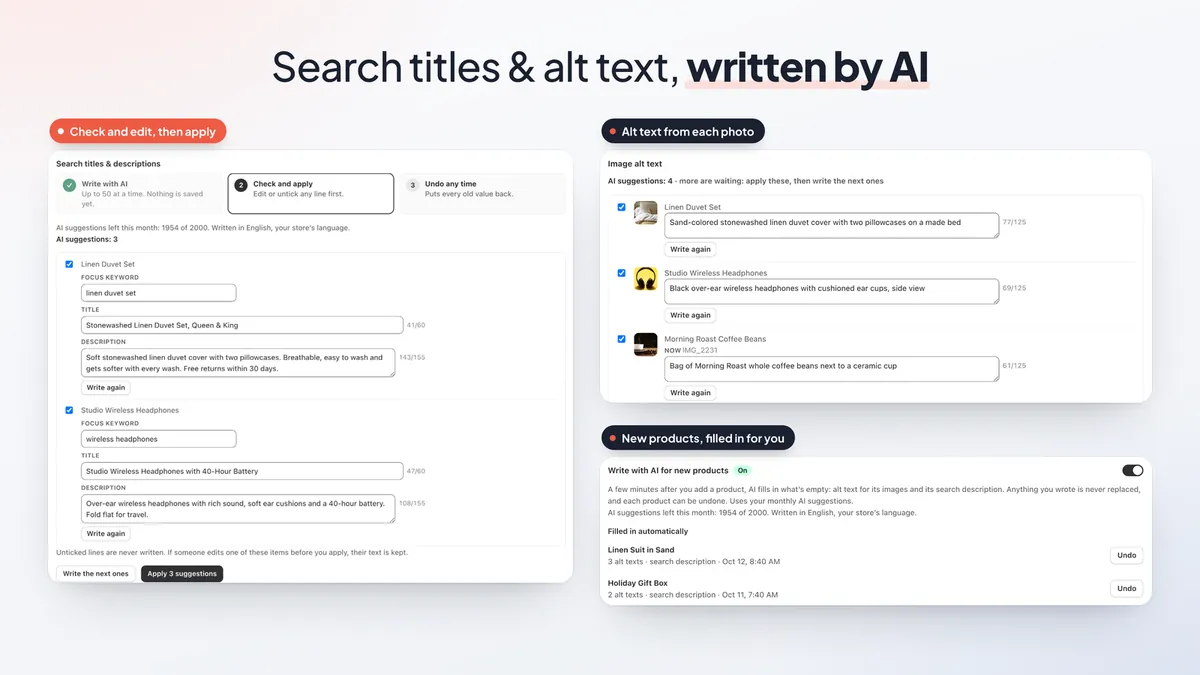
- Search titles and meta descriptions for products, collections, pages and blog posts, each with a focus keyword you can edit. Titles stay within 60 characters and descriptions within 155, so Google doesn't cut them off.
- Alt text from each photo. The AI looks at the image itself and writes a short description of up to 125 characters, which helps image search and shoppers who use screen readers.
- Check and edit, then apply. Suggestions arrive up to 50 at a time. Edit any line, untick what you don't want, or ask for a new version. Nothing is saved until you click Apply, and you can undo any time.
- Write with AI for new products. Turn it on and, a few minutes after you add a product, the app fills in only what's empty: alt text and the search description. Anything you wrote is never replaced, and each product has its own Undo.
SEO check and page-by-page audit
The free SEO check gives your store a score and a list of what to fix first. The new page-by-page audit goes further. It visits your home page, collections, your 100 newest products, pages and blog posts and runs about 30 checks on each one.
- It reads the real page title, including the store name your theme adds, so AI titles don't run too long.
- It finds broken links and lets you redirect them in one click (Pro).
- It runs mobile checks, such as tap targets and pages that scroll sideways.
- It works on password-protected stores: enter the password for a run, or save it to reuse later.
Pro adds bulk tools that fill missing titles, descriptions and alt text from a pattern you choose. See our Shopify SEO checklist for what to fix in what order.
Rich snippets (JSON-LD) for Google (Pro)
Rich snippets are the review stars, prices and stock details Google can show under your link. The app scans your theme and adds JSON-LD structured data only where it is missing, so you don't end up with duplicates.
- Products with review stars from popular review apps, prices, sale prices with the old price, back-order and pre-order stock, and product variants grouped together.
- Return policy, shipping details and your physical store, filled in from your Shopify settings.
- Breadcrumbs, articles, your organization and a collection product list.
- Search engine visibility: hide individual products or pages from search engines, and keep search, tag and vendor pages out of Google.
Our Shopify rich results guide explains what each type does.
404 redirects and clean URLs (Pro)
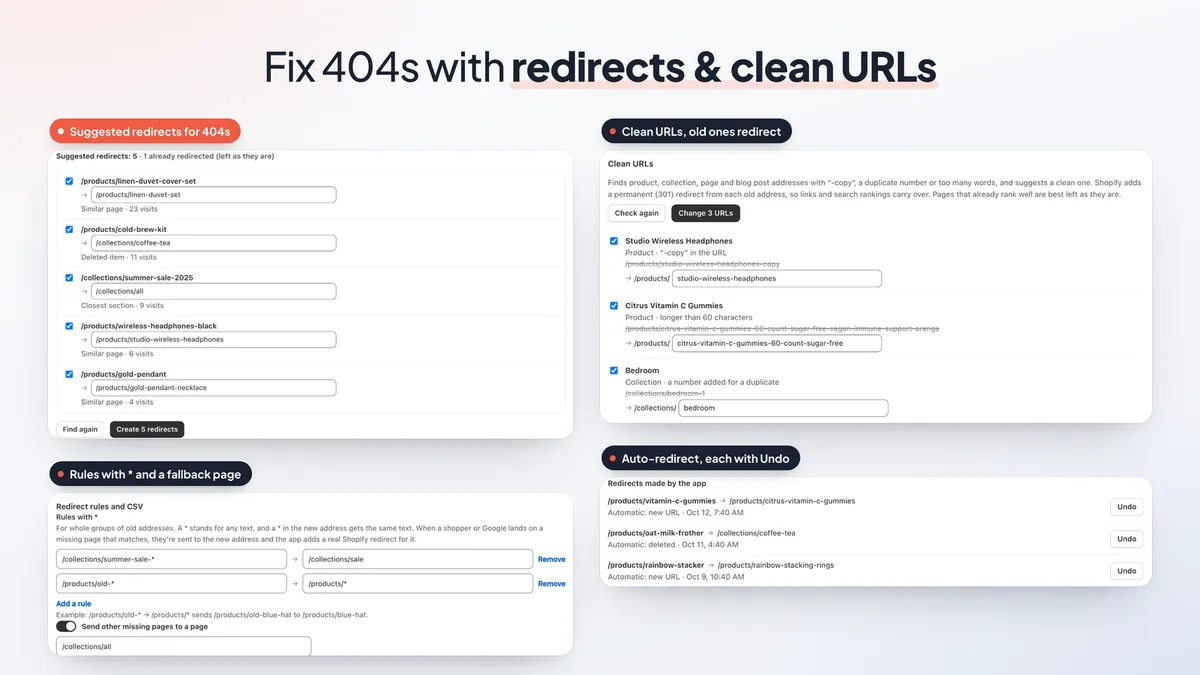
Deleted products and renamed URLs leave shoppers and Google on "page not found". The app records pages that return a 404 and suggests where each one should go: a similar page, the collection of a deleted product, or the closest section. Tick the ones you want and create them in one click.
- Rules with * for whole groups of old addresses, plus a fallback page for anything else that is missing.
- CSV import and export in Shopify's format, up to 1,000 redirects per import.
- Auto-redirect: when you change a product or collection URL, or delete a product, the old address points to the right place.
- Clean URLs: finds addresses with "-copy", duplicate numbers or too many words, suggests a clean one and keeps a permanent (301) redirect from the old address.
- One redirect covers every language folder of your store, and every redirect the app makes has its own Undo.
Get found in AI search and Google
These tools help your store show up in AI assistants and in Google:
- AI agent readiness check: six checks plus Google Lighthouse's agentic browsing test show how easy your store is for AI agents to read.
- llms.txt (Pro): the app generates a summary of your collections, products with prices, pages, blog and policies for AI assistants, and keeps it current. You paste a short template into your theme once.
- AI visibility (Pro): once a month, the app asks Claude, with web search, up to 10 questions your shoppers might ask. You write them or pick from suggestions. The report shows whether your store is named or linked, where it appears, which other sites are cited and how that changes over time.
- IndexNow (Pro): tells Bing and other IndexNow search engines when your pages change, so new and updated pages are found sooner.
- Google Search Console (Pro): connect your account to see clicks, keywords, top pages and countries, inspect a URL, track keywords and submit your sitemap. Our Search Console guide covers the setup.
Image optimizer and speed tools
Speed is still at the heart of the app. Run a speed test any time on the free plan and see your score, the top problems and your history. The app cleanup scan is free too: it finds code left in your theme by apps you removed, and flags code that tries to trick speed tests.
On Pro:
- Image compression with restore. Pick a quality preset and check a before-and-after preview. Originals are kept so you can restore them. Theme, collection and blog images can be compressed too, and new products automatically.
- Quick setup presets: Safe, Recommended or Fastest, then check and save.
- Script manager: delay a script, or load it only on the page types that need it. Prerender, which starts loading the next page as the shopper presses a link, and a chat widget delay are here too.
- Weekly re-test with an optional weekly email, and real-shopper speed measured from your own visitors by page type.
- Guided cleanup of leftover app code on a copy of your theme.
New to image work? Start with how to optimize Shopify images and our Core Web Vitals guide.
A simpler admin, in your language
The menu now has six clear pages: Speed report, Speed features, Images, SEO, Redirects and Plan.
The whole admin can be shown in 32 languages from the language picker, with dates, numbers and money formatted for your language. On Pro, the built-in AI assistant can run a speed test, apply a speed preset, compress images or fill in alt text and search descriptions for you, and asks you to confirm before it changes anything.
Plans and pricing
Free: the scans. Run a speed test any time, the SEO check, the page-by-page audit, the AI search readiness check, the app cleanup scan and a scan of your catalog images.
Pro, $9.99 a month with a 7-day free trial: everything in Free, plus every change to your store: the speed features, image compression with restore, 404 tracking, AI alt text, titles and descriptions, Google rich results and search visibility, bulk SEO tools, redirects, IndexNow, Search Console, llms.txt, AI visibility, the script manager, prerender, chat delay, the weekly re-test and real-shopper speed. It's a flat price with no credits or overages. Compression and AI writing are not part of the free plan. See every feature on the EA SEO & Page Speed Optimizer page.
How to get started
- Install EA SEO & Page Speed Optimizer from the Shopify App Store.
- Open Speed report and run your first speed test.
- Open SEO and run the SEO check to see your score and what to fix first.
- Start the 7-day free trial when you want compression, AI writing, rich results or redirects.
- Apply AI titles and alt text, turn on rich results and fix your 404s, then re-test.
💡 Ready to put this into practice? Shopify's free 3-day trial — then $1/month for 3 months, plus 1% of sales back in credits — is long enough to set it up and see the numbers. Start your free trial → (affiliate link)
Frequently Asked Questions
Is EA SEO & Page Speed Optimizer free?
Yes. The free plan covers the scans: a speed test any time, the SEO check, the page-by-page audit, the AI search readiness check and a scan of your theme for code left behind by apps you removed. Pro costs $9.99 a month with a 7-day free trial and adds image compression, AI titles, descriptions and alt text, Google rich results, redirects, the AI search tools and the speed tools. There are no credits or overages. Compare the plans.
Does the AI change my store without asking?
No. AI writing is a Pro feature in your Shopify admin. You see every suggested title, description and alt text first, edit or untick any line, and only then apply. Applied changes can be undone, and if someone edits an item before you apply, their text is kept.
Which AI does the AI visibility check use?
It asks Claude, with web search, the shopper questions you choose (up to 10) once a month, and shows whether your store is named or linked in the answers and which other sites are cited. It is part of Pro.
What is llms.txt?
llms.txt is a plain-text file that summarizes your store for AI assistants and answer engines. On Pro, the app generates one from your collections, products, pages, blog and policies, and keeps it current. You paste a short template into your theme once.
Can I undo image compression and redirects?
Yes. The original images are kept so you can restore them, and every redirect the app creates, including automatic ones, has its own Undo.
Rank higher and load faster
Install free, run the SEO check and see what to fix first. See every feature and plan.
Install Free on Shopify