
A free language switcher with live Google Translate
Most shoppers buy more easily in their own language. The quickest way to give them that is a language switcher that translates the page the moment they pick a language. That part of EA AI Language Translate is now free.
The free plan includes:
- A language switcher in your theme that translates every page live with Google Translate, in 240+ languages. Text from other apps on the page is translated too.
- Automatic language by browser, so a shopper whose browser is set to Spanish can see your store in Spanish without searching for the menu.
- "Don't translate numbers", a setting that keeps prices, quantities and other numbers exactly as your theme shows them.
- A count of language picks, so you can see that shoppers are using the switcher.
Each language in the menu is shown in its own name, like "Español", "Deutsch" or "日本語", so shoppers can find their language at a glance.
AI store translations Google can index
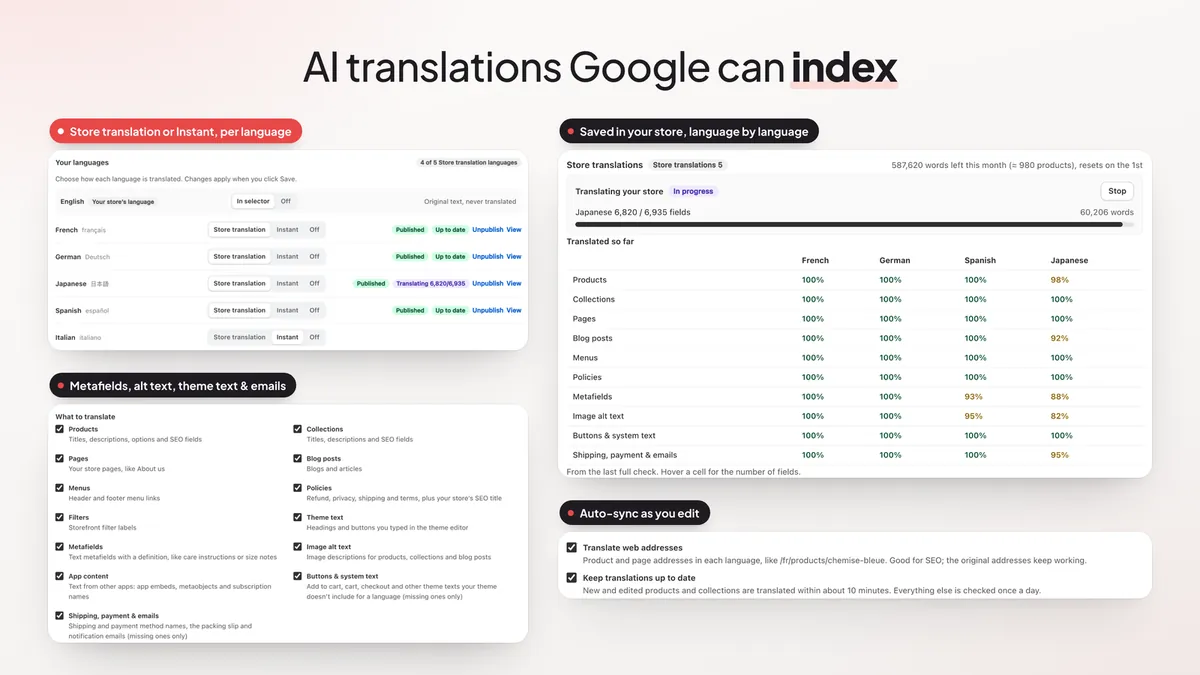
Live translation happens in the browser, so search engines don't see it. If you want to rank in other languages, you need translated pages saved in your store. That is what Store translations do (Translations 5 and Translations 20 plans).
The AI translates your content and saves it as real Shopify translations. Each language gets its own pages that Google can index. This month, Store translations got a lot wider:
- Metafields, like care instructions or size notes, when they are text with a definition.
- Image alt text for products, collections and blog posts, which helps image search and screen reader users.
- App content, such as text from app embeds and subscription plan names.
- Buttons and system text, like "Add to cart", that your theme doesn't include for a language. Only the missing ones are filled in.
- Shipping, payment and emails (optional): delivery and payment method names, the packing slip and notification emails.
Store translations now have their own page in the app. It shows how much of each content type is translated in each language, and translations stay up to date as you add or edit products.
Your wording: glossary, tone and a side-by-side editor
A good translation still has to sound like your brand. Three new tools help with that.
- Glossary (Live Translate). Add words to keep, like your brand or product names, and they are never translated. You can also set your own translation for a word, for all languages or just one.
- Tone and store context (Store translations). Tell the AI what your store sells and choose formal or informal wording for each language. A preview shows a few of your products translated before anything is saved.
- Side-by-side editor (Store translations). See the original next to the translation, then filter, search, find and replace, translate a field again, or go back to the previous version. Mark translations as reviewed as you go. Anything you edit by hand is never replaced by automatic updates.
If you sell in several countries with Shopify Markets, the editor also lets you use different wording for one market, like Canadian English for shoppers in Canada. And you can translate just a selection, such as one collection, instead of the whole store.
The right language by country
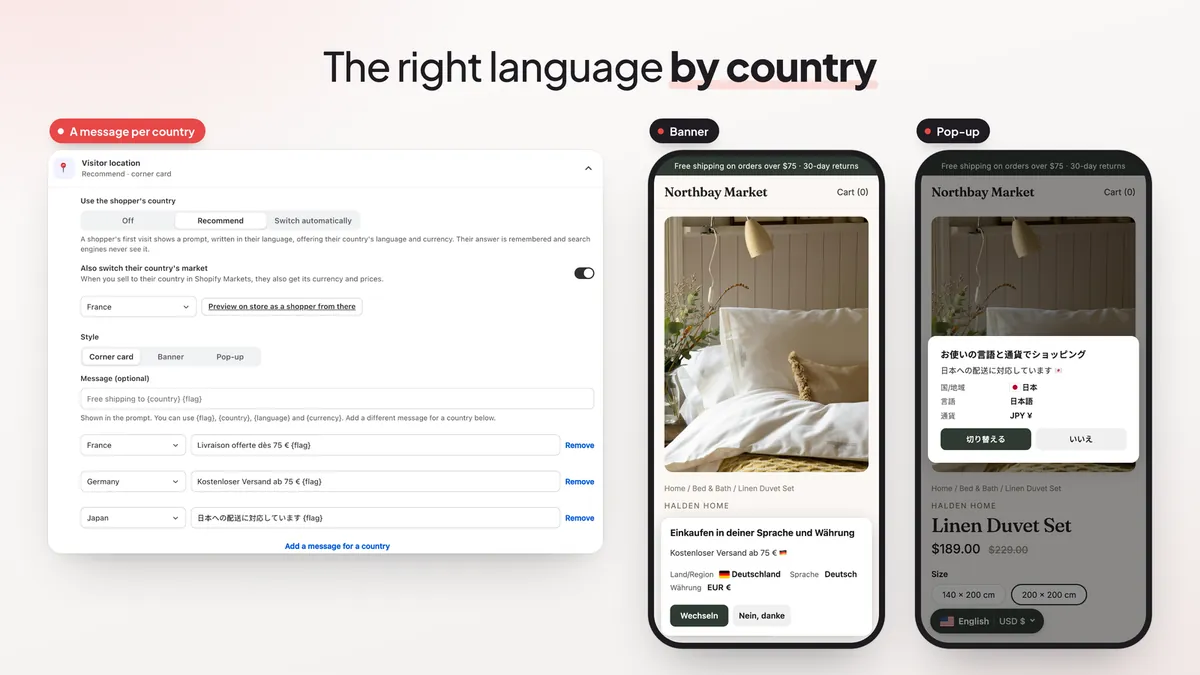
A shopper from Mexico who lands on your English store should not have to look for the language menu. Visitor location (Live Translate) uses the shopper's country to offer their language, or to switch it for them.
- Choose Recommend to show a prompt in the shopper's language, or Switch automatically.
- Show the prompt as a corner card, a banner or a pop-up, with your own message for each country.
- If you sell to that country in Shopify Markets, the shopper can also switch to their market, with its currency and prices.
- Limit it to shoppers from the countries you choose. The answer is remembered, and search engines never see the prompt.
Two more Live Translate tools sit next to it. Page and country rules let you keep some pages untranslated, hide the switcher on some pages, or set which languages a country sees. The country and currency picker adds countries and currencies to the language menu.
A language menu that fits your theme
The language switcher has new ways to look at home in your store. You can show flags as images, add a slim top bar with the most likely languages, or place a language list block in your theme. Ready-made templates (Clean pill, Dark pill, Flat flags and Compact code) give you a finished look in one click.
For Arabic, Hebrew, Persian and Urdu, right-to-left languages (Live Translate) flips the page layout so it reads the right way. The switcher also loads more lightly now: a small script loads first and the rest follows when it is needed, while the closed menu looks the same as before.
On Live Translate you also get insights per language: which languages your shoppers pick, and orders and revenue by language, so you can see which languages are worth more work.
Backups, export and Shopify Flow
Translations are work you don't want to lose. On the Store translations plans:
- Nightly backups keep the last 7 days, with "Back up now" and "Restore" buttons.
- Export and import in CSV or XLIFF, so a translator can review your text and you can bring it back in.
- Shopify Flow: a "Translate product" action and a "Store translation finished" trigger, so a new product can be translated as part of your workflows.
An easier admin, in your language
The app's admin can now be shown in 32 languages from the language picker, and numbers, money and percentages follow the language you choose.
Live Translate also includes the AI assistant, a helper for you inside the admin. Describe what you want in plain words, like "add French and German, keep my brand name, and show the menu at the bottom left". It prepares every change, and one "Confirm all" saves them.
Plans and pricing
- Free ($0): language switcher in your theme, Google instant translation in 240+ languages, automatic language by browser, shoppers choose their language, total language picks.
- Live Translate ($9.99/month, 7-day free trial): everything in Free, plus glossary and words to keep, right-to-left languages, custom CSS and the AI assistant, visitor location (language by country), page and country rules, the country and currency picker, and orders and revenue by language.
- Translations 5 ($24.99/month): everything in Live Translate, plus AI translations saved in Shopify that Google can index, up to 5 languages and 1,000,000 words a month.
- Translations 20 ($49.99/month): everything in Translations 5, up to 20 languages and 4,000,000 words a month.
See the full comparison on the EA AI Language Translate page.
How to get started
- Install EA AI Language Translate from the Shopify App Store.
- Turn on the app embed in your theme, then choose where the language switcher shows and how it looks.
- Leave automatic language by browser on, so shoppers see their language right away.
- Want more control? Start the 7-day free trial of Live Translate to add your glossary and language by country.
- Want to rank in other languages? Pick a Translations plan and choose your languages on the Store translations page.
New to selling in more than one language? Start with our guide on how to translate your Shopify store, then read how AI store translation helps you sell in new countries and our geolocation and auto-translate guide. If you also show local prices, see how to set up Shopify multi-currency.
💡 Ready to put this into practice? Shopify's free 3-day trial — then $1/month for 3 months, plus 1% of sales back in credits — is long enough to set it up and see the numbers. Start your free trial → (affiliate link)
Frequently Asked Questions
Is EA AI Language Translate free?
Yes. The free plan gives you a language switcher with live Google Translate in 240+ languages and automatic language by browser. Live Translate is $9.99 a month with a 7-day free trial. Store translations, the AI translations saved in Shopify, cost $24.99 a month for up to 5 languages or $49.99 a month for up to 20. Compare the plans.
What is the difference between live translation and store translations?
Live translation uses Google Translate in the shopper's browser the moment they pick a language, and it is not indexed by search engines. Store translations use AI to create translations that are saved in Shopify, so each language gets pages that Google can index.
Can I keep my brand name and product names untranslated?
Yes. Add them to the glossary (Live Translate) as words to keep, and they stay as you wrote them. With Store translations you can also set the tone and formality the AI should use.
Can I show a different language to shoppers from different countries?
Yes. Visitor location (Live Translate) suggests or switches the language based on the shopper's country, and can also switch them to their country's Shopify market so they see their currency.
Can I fix a translation by hand?
Yes. On a Store translations plan, the side-by-side editor shows the original next to the translation. Text you edit there is never replaced by automatic updates.
Does the AI translate for my shoppers?
No. Our AI is only used from your admin: Store translations are created there and saved in Shopify, and the AI assistant is a helper for you inside the app. Shoppers only see the finished pages and the language switcher.
Sell in every language
Install free and add a language switcher with live Google Translate to your store. See every feature and plan.
Install Free on Shopify