
A cart drawer you build from cards
A slide cart drawer (also called a side cart) keeps shoppers on the page they are browsing. They add a product, check the cart and go to checkout without a page load. The hard part has always been setting one up. This release makes it simpler.
The drawer editor is now a list of cards: cart behavior, header and colors, announcement, cart items, cart notes and more. Turn a section on with its switch, open the card to change it, and drag sections to change their order. A live preview next to the cards shows the drawer with items or empty, so you see each change before it reaches your store.

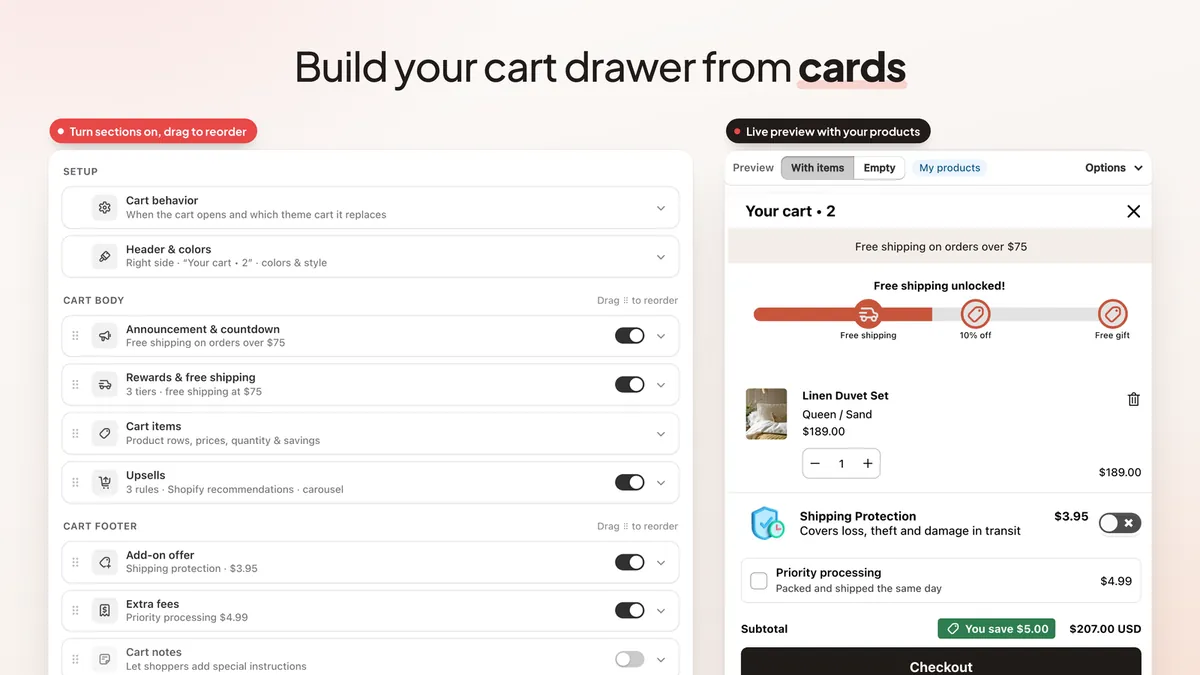
Two smaller changes help too:
- A clear status card. The Cart drawer tab tells you whether the drawer is live or not shown on your store, with a Turn on button when it is off.
- A steady page behind the drawer. While the drawer is open, the page behind it stays still, on phones as well as desktop.
For ideas on what to put in the drawer, read our guide to Shopify cart drawer optimization.
A sticky add to cart bar that waits its turn
A sticky add to cart bar keeps the product, variant picker and Add to Cart button on screen while shoppers scroll a long product page. It is on the free plan.
New: the bar can stay hidden until your theme's own Add to Cart button scrolls out of view, and hide again when the shopper scrolls back to it. Shoppers never see two Add to Cart buttons at once. If the app can't find the theme's button on a page, the bar falls back to your scroll setting.
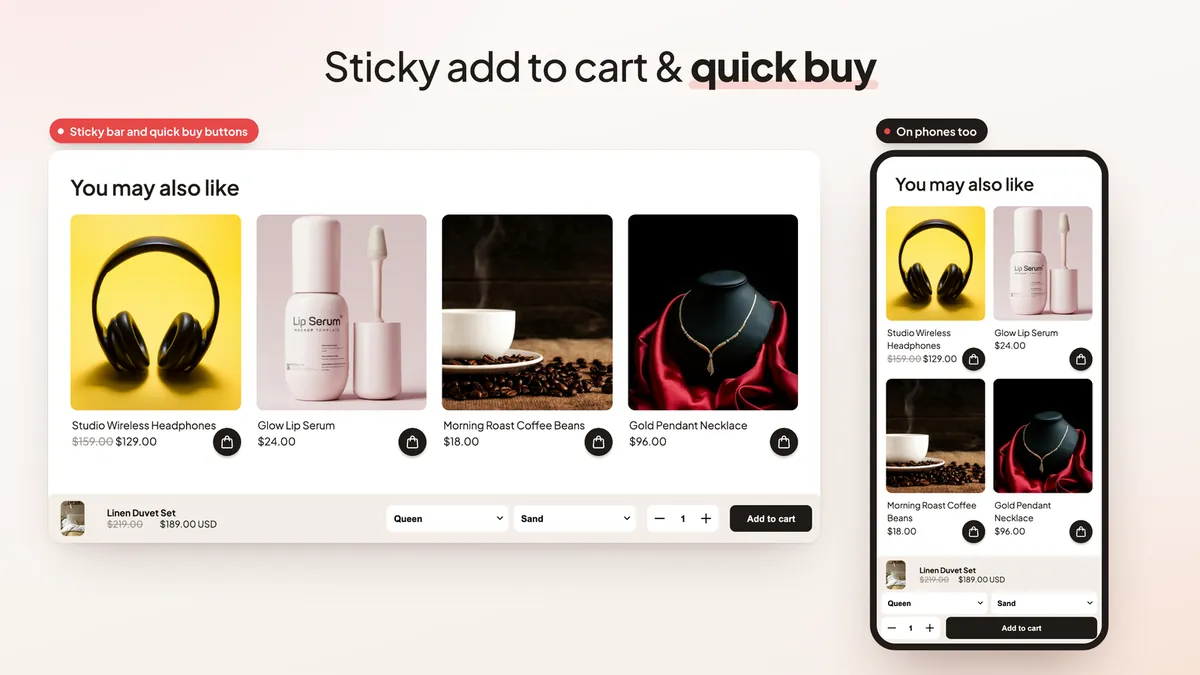
Quick buy buttons let shoppers add to cart from collection pages without opening the product, also on the free plan. On Pro you can hide quick buy for products with a tag you choose. New to sticky bars? Start with how to add a sticky add to cart button to Shopify.
Upsells and free gifts, in the cart, on product pages and after checkout
These features are part of Pro.
- Upsell rules. Choose which products to suggest based on what is in the cart, and show them inside the drawer (a grid layout is new) or in a side panel next to the drawer.
- Upsells on product pages. A new theme block, "Upsells (EA Sticky Cart)", shows suggestions on your product pages. It can use your cart upsell rules, products you pick, or Shopify's recommendations. The "Add to product page" button opens the theme editor for you. Shopify adds app blocks per product template, so add it to every template you use.
- Upsells on the thank-you page. Add the "EA Sticky Cart upsells" block to your thank-you and order status pages in Shopify's checkout editor, and suggest one more product right after the order is placed.
- Rewards list. Under the rewards bar, a list shows each reward as done or locked, with how much is left to unlock it. If a shopper removes a free gift they earned, a Claim button adds it back.
- Gift rules and a gift picker. Let shoppers choose their free gift, and set rules for when a gift applies. The app's discount checks them at checkout.
- Text variables. Insert the amount left, the next reward, the reward just unlocked or the cart total into your messages from a simple insert menu, so the text updates as the cart changes.
See how to add upsells to your Shopify store and our free gift with purchase guide for offer ideas.
Express checkout, fees and checkout rules
Also on Pro:
- Express checkout buttons without theme code. The drawer now builds its express buttons from the ones Shopify already shows on your cart page, such as Shop Pay, PayPal or Google Pay. There is no snippet to paste, and it works across many themes. You can set the button height, corner radius, gap and a stacked layout.
- Hide express checkout by rule. Hide the express buttons when a rule matches, for example a cart value, a product tag or a customer tag.
- Extra fees. Add up to 3 fees, such as handling or priority processing. Each one is optional or required, and can apply only between a minimum and maximum cart value. Required fees are added and removed as the cart changes. Optional fees are never pre-ticked; the shopper chooses them.
- Payment and shipping method rules. Hide, rename or move a payment or shipping method first or last at checkout. Rules can use the cart subtotal, the shipping country, a product tag in the cart or a customer tag.
Add-ons such as shipping protection sit in the same drawer footer. For more on smoothing the last step, read Shopify express checkout optimization.
A/B tests and insights
Cart A/B tests (Pro) split shoppers between two cart setups and count carts and orders for each. Tests can now pick the winner on their own: a variant has to be clearly ahead, with enough traffic, after at least 7 days. If no winner is clear after 30 days, the original setup stays.
The Home page also has a new Insights card. It reads your settings and recent results and suggests what to try next, such as a free shipping goal that may be set too high or too low, or upsells that are switched off. Detailed cart analytics, including revenue by feature, are part of Pro.
The admin in your language
The app's admin is now translated into 31 languages besides English. Choose yours from the globe menu at the top of the page; the whole admin switches, including Shopify's left menu. Money on the Home and Analytics pages shows in your store currency, formatted the way your language writes it. The Languages & translations card on the More tab is where you translate the drawer's texts for shoppers in each of your store's languages.
Plans and pricing
- Free ($0): slide cart drawer, sticky add to cart bar, quick buy buttons, announcement bar, cart notes and discount code field.
- Pro ($9.99/month, 7-day free trial): everything in Free, plus cart upsells and the side upsell panel, the rewards bar with free shipping and gifts, add-ons, fees and shipping protection, express checkout, timers and badges, rules, targeting and A/B tests, product page and thank-you page upsells, analytics, custom code and AI.
AI tools such as Match my store design and Ask AI are on Pro only and run in your admin, not on your storefront. Full details are on the EA Sticky Cart Drawer & Upsell page.
How to get started
- Install EA Sticky Cart Drawer & Upsell from the Shopify App Store.
- Turn on the app embed in your theme editor. No theme code changes are needed.
- Open the Cart drawer tab, check the status card and click Turn on if the drawer is not shown yet.
- Turn on the cards you want, drag them into order and check the live preview, then save.
- Want upsells, rewards or checkout rules? Start the 7-day free trial of Pro from any Pro badge.
Still deciding what your cart should do first? Our guide on how to reduce cart abandonment on Shopify is a good place to start.
💡 Ready to put this into practice? Shopify's free 3-day trial — then $1/month for 3 months, plus 1% of sales back in credits — is long enough to set it up and see the numbers. Start your free trial → (affiliate link)
Frequently Asked Questions
Is EA Sticky Cart Drawer & Upsell free?
Yes. The free plan includes the slide cart drawer, the sticky add to cart bar on product pages, quick buy buttons, an announcement bar and cart notes with a discount code field. Pro costs $9.99 a month with a 7-day free trial and adds upsells, the rewards bar, add-ons, fees, express checkout, timers and badges, rules, A/B tests, analytics and AI. Compare the plans.
Will the sticky add to cart bar cover my theme's own button?
It doesn't have to. Turn on the option to show the bar only after your theme's Add to Cart button has scrolled out of view. The bar hides again when the shopper scrolls back up to the button.
Do I need to paste code into my theme for express checkout buttons?
No. The express checkout buttons in the cart drawer (Pro) are built from the buttons Shopify already shows on your store's cart page, so there is no theme snippet to add.
Can I add a fee or shipping protection to the cart?
Yes, on Pro. You can add up to 3 fees, each optional or required, and an add-on such as shipping protection. Optional fees are never ticked for the shopper; they choose them.
Can I hide or rename payment and shipping methods at checkout?
Yes, on Pro. Payment and shipping method rules can hide, rename or move a method first or last, based on the cart subtotal, the shipping country, a product tag in the cart or a customer tag.
Can I use the app in my own language?
Yes. The admin is translated into 31 languages besides English. Pick yours from the globe menu, and prices show in your store currency, formatted for that language.
Build your cart drawer today
Install free, build your cart drawer from cards and preview it before it goes live. See every feature and plan.
Install Free on Shopify