

Sticky Add to Cart Bar & Slide Cart Drawer for Shopify
EA Sticky Add to Cart Drawer replaces your theme's cart with a slide cart drawer built to raise order value, and keeps Add to Cart in reach with a sticky add to cart bar and quick buy buttons. The cart drawer, sticky bar and quick buy are free; Pro adds upsells, a rewards bar with free gifts, checkout rules and A/B tests for $9.99 a month.
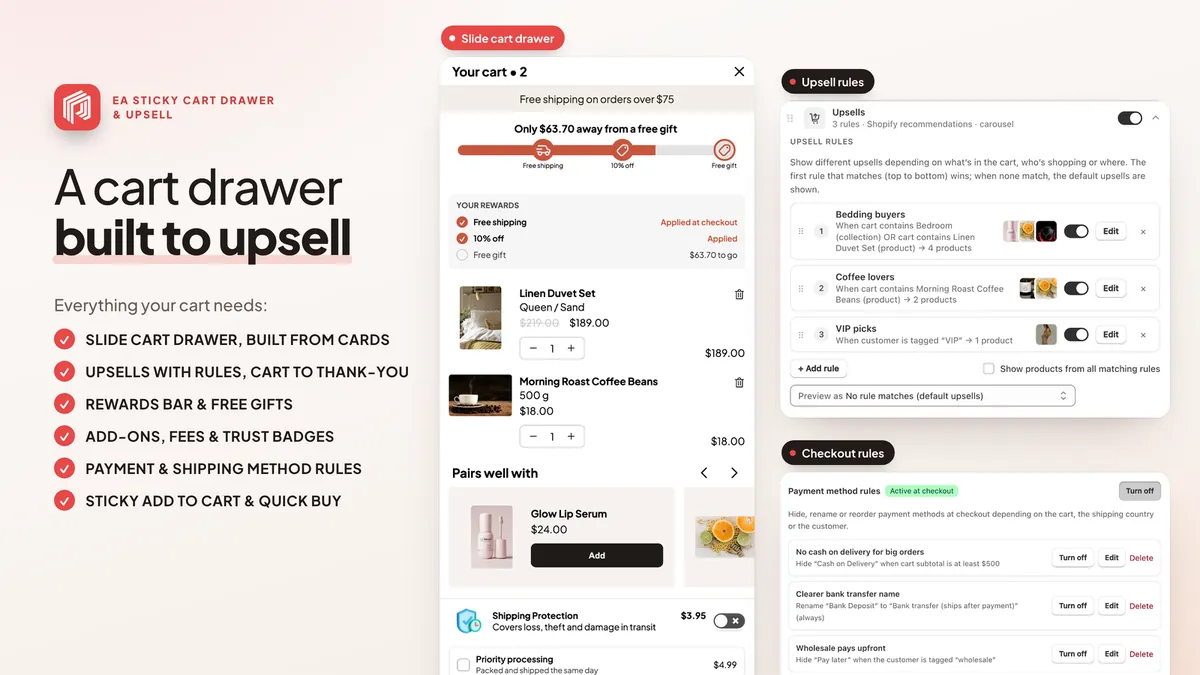
At a glance
| App Store name | EA Sticky Add to Cart Drawer |
|---|---|
| Developer | EasyApps (EasyApps Ecommerce) |
| Price | Free plan; Pro $9.99/month with a 7-day free trial |
| Rating | 4.9/5 from 218 reviews on the Shopify App Store |
| Works with | Every Shopify theme, as an app embed (no theme code edits) |
| AI assistants | ChatGPT, Claude and Claude Code through the free EA Ecommerce Apps connector: ask for stats and ideas, and have the AI prepare cart drawer and sticky bar settings as drafts you can publish and undo · Install in ChatGPT |
What it does
Slide cart drawer
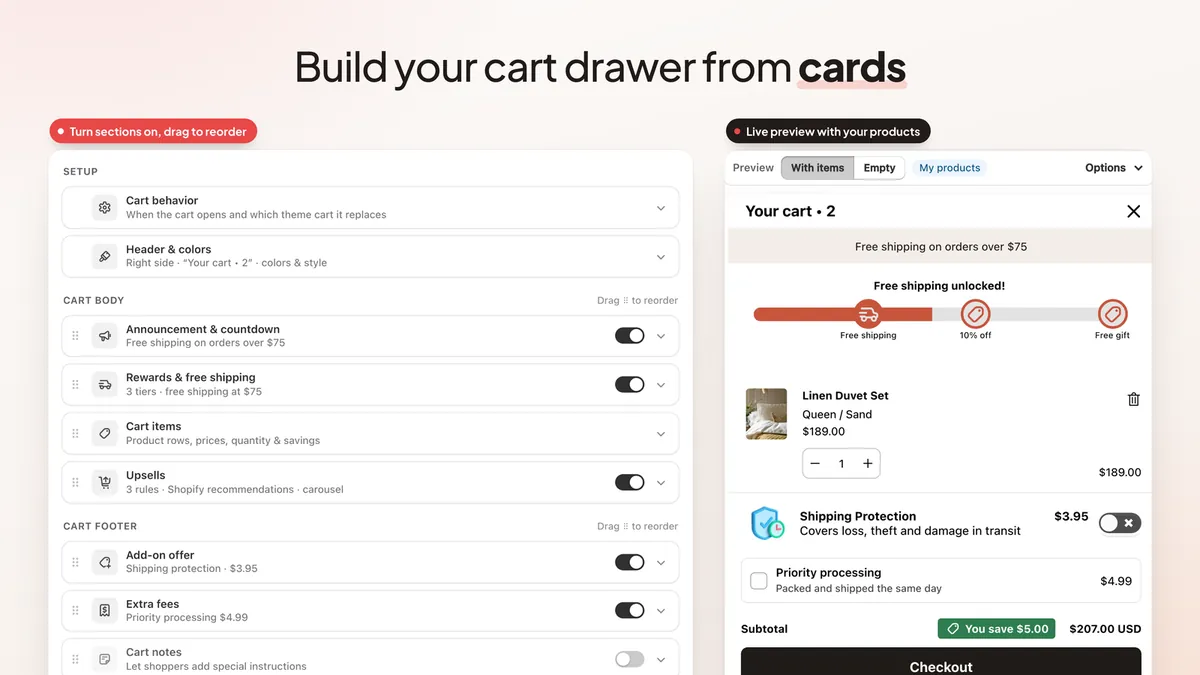
A side cart that opens over the page, built from cards in a live preview: items, totals, notes, discount code, trust badges and express checkout buttons.
Upsells with rules
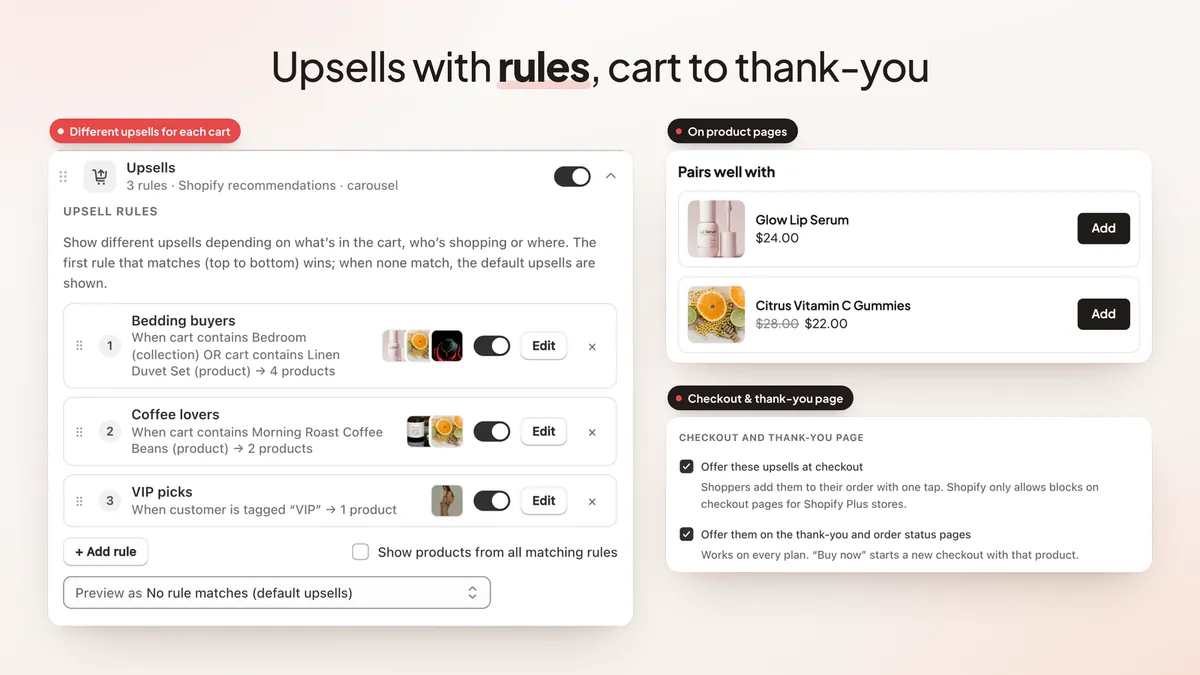
Show the right add-on in the cart drawer, on product pages and on the thank-you page, chosen by rules you set.
Rewards bar and free gifts
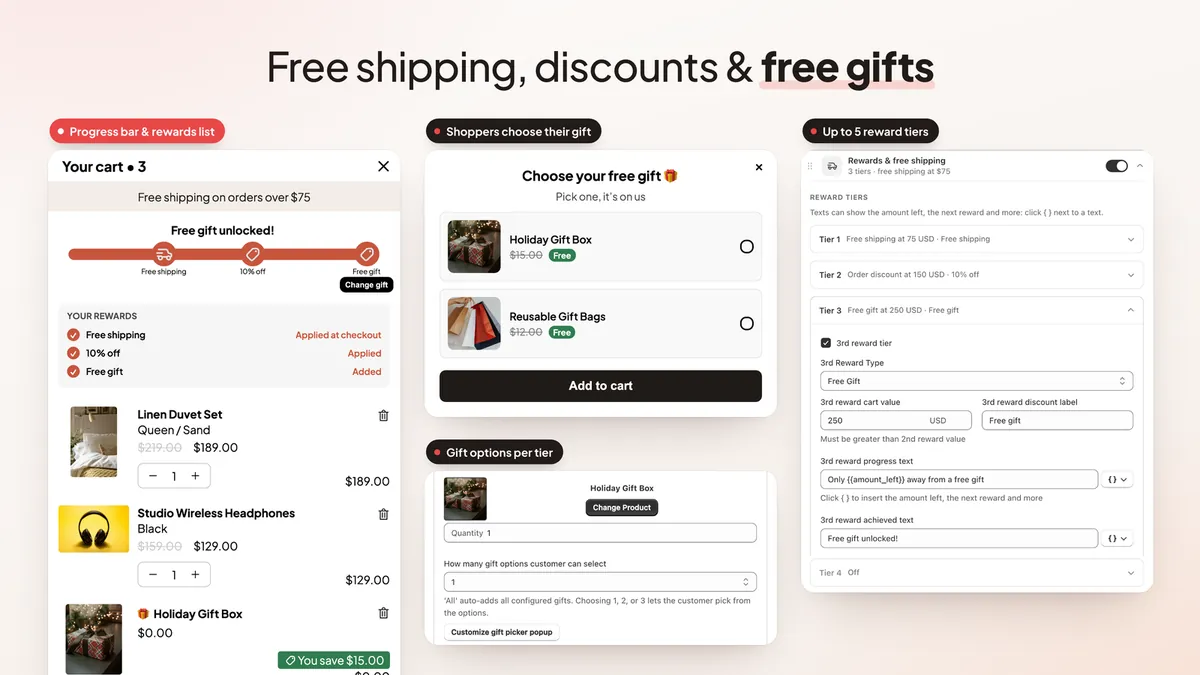
Tiers for free shipping, a discount and a free gift, with a gift picker and a rewards list in the drawer.
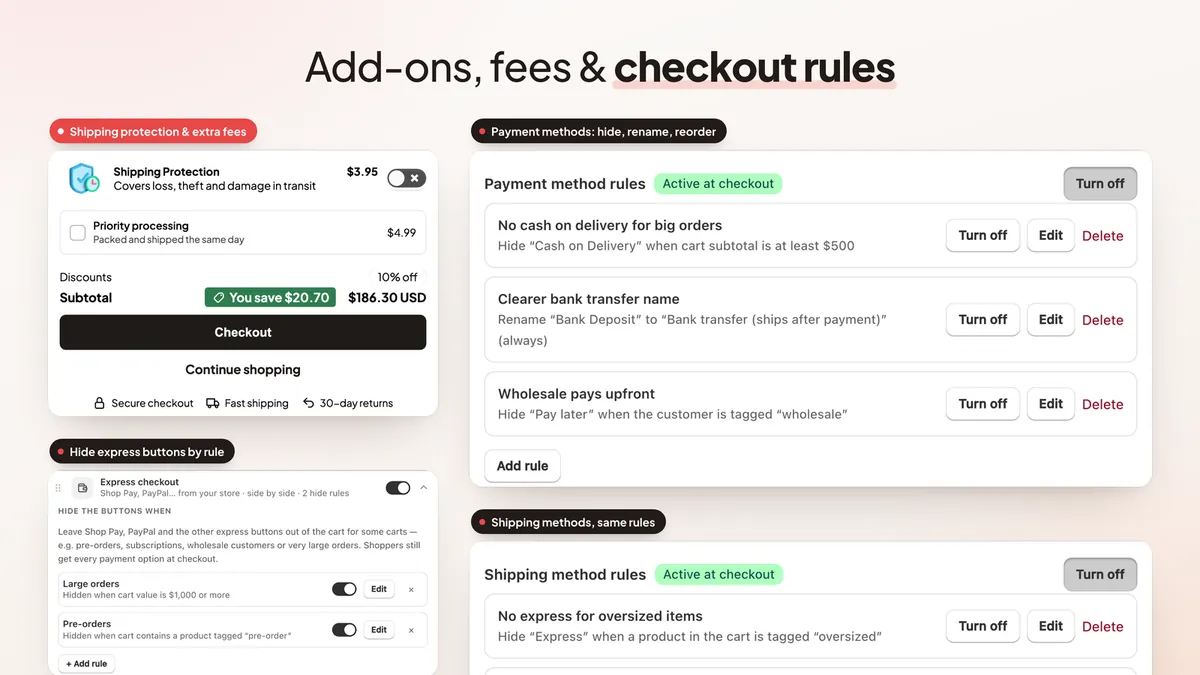
Add-ons and fees
Offer add-ons from one-click templates (shipping protection, gift message, gift wrap, engraving and more) or any product, ask the shopper for a text such as a gift message, and add optional or required fees to the cart.
Payment and shipping rules
Hide, rename or reorder payment and shipping methods at checkout, and hide express buttons by rule.
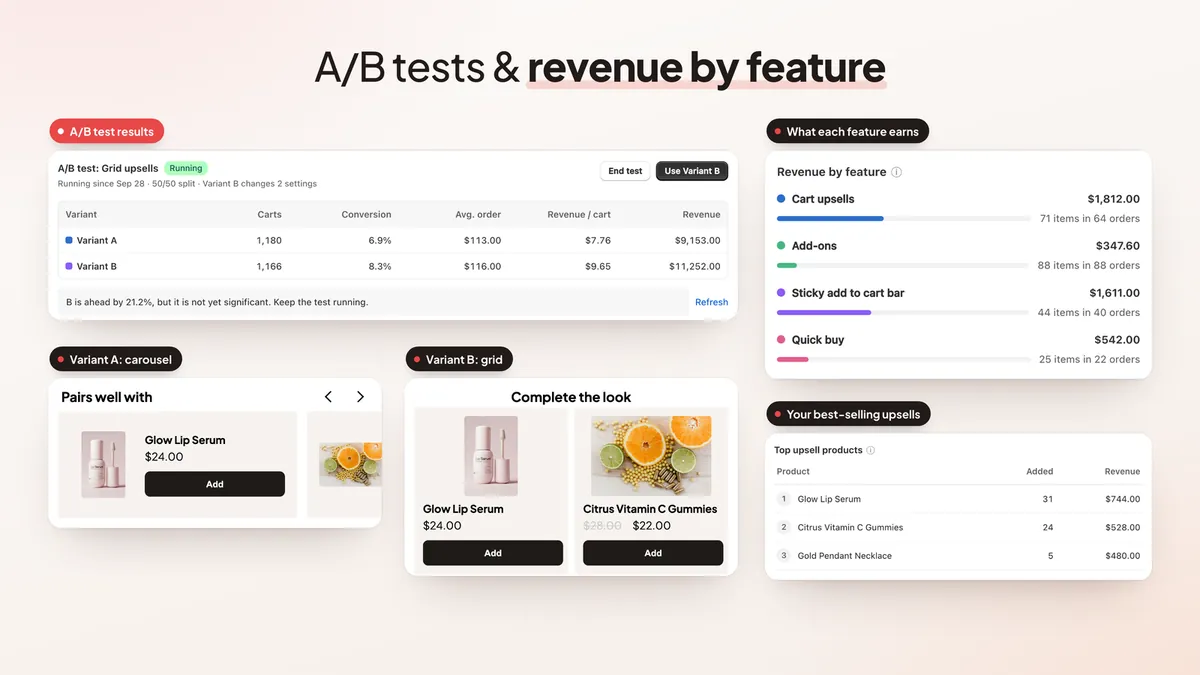
Cart A/B tests and insights
Test two cart setups and keep the winner; insights show which features earn the most.
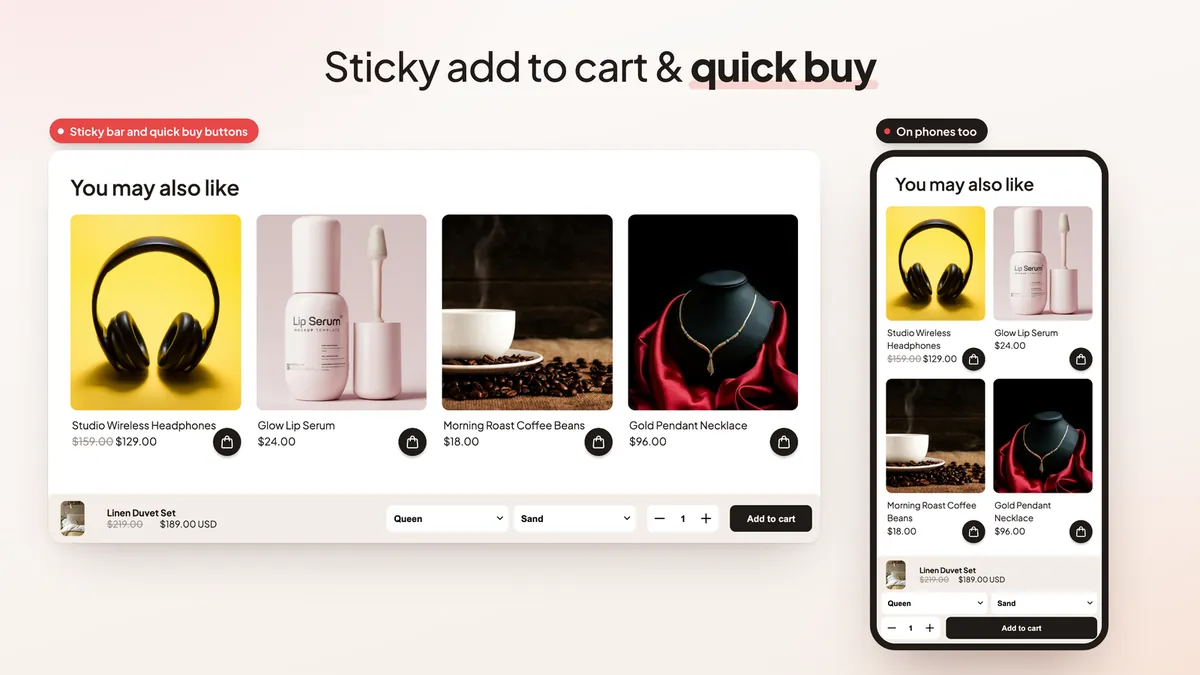
Sticky add to cart bar
A bar that appears once shoppers scroll past your theme's Add to Cart button, on desktop and phone.
Quick buy buttons
Add to cart from collection pages without opening the product, with the option to hide it for tagged products.
New in November 2026
- AI assistant does it all. Ask AI fills every product and collection picker and creates upsell, gift and express checkout rules by name. How it works.
- Specific customer condition. Search customers by email or name and pick them for a rule.
- Click the preview to edit. Click any part of the drawer, sticky bar or quick buy preview to jump to its setting. Guide.
- Google Translate language. Translate the cart to your store's language or the shopper's browser language.
- Paid gift messages. Any add-on can ask the shopper for a text, such as a $1.99 gift message, saved on the order. One-click templates (gift message, gift wrap, engraving, shipping protection and more) create their own product, and a required text holds checkout until it's written.
- Collection upsells. An upsell rule can offer whole collections, up to 3 per rule, with one discount; sold-out and in-cart products are skipped.
- "Cart has a subscription" condition. Rules can check whether the cart has a subscription item, for upsells, the side panel and express buttons.
- Required order note. Checkout waits until the shopper has written a note, for engraving text or delivery details. How to set it up.
- Sold-out upsells hidden. Products that can't be bought never take an upsell slot.
- Keyboard-friendly drawer. Escape closes the drawer, focus moves in and back out, and screen readers announce it as a dialog.
- Header logo. Show your logo beside or instead of the cart title, or use the logo from your Shopify brand settings.
- Cart timer options. Restart the timer when an item is added, and empty the cart when the timer runs out.
See every update in What's new · Works with ChatGPT and Claude through the EA Ecommerce Apps connector, now in ChatGPT's plugin directory.
See it in action
Screenshots from the app and a sample store.
Plans & pricing
Free
$0
- Slide cart drawer
- Sticky add to cart bar
- Quick buy buttons
- Announcement bar
- Cart notes & discount code field
Pro
$9.99/month
7-day free trial
- Everything in Free
- Cart upsells & side upsell panel
- Rewards bar, free shipping & gifts
- Add-ons, fees & shipping protection
- Express checkout, timers & badges
- Rules, targeting & A/B tests
- Checkout & thank-you page upsells
- Analytics, custom code & AI
Prices in USD, billed monthly through Shopify. Development stores are free.
Frequently asked questions
What is a slide cart drawer?
A slide cart drawer is a cart that slides in from the side of the page when a shopper adds a product, so they can review the cart and check out without leaving the page they are on.
What is a sticky add to cart bar?
It is a bar that stays on screen while a shopper scrolls a product page, with the product, variant and an Add to Cart button. EA Sticky Add to Cart Drawer shows it once the theme's own button scrolls out of view.
Is EA Sticky Add to Cart Drawer free?
Yes. The free plan includes the slide cart drawer, the sticky add to cart bar, quick buy buttons, an announcement bar and cart notes with a discount code field. Pro costs $9.99 a month with a 7-day free trial and adds upsells, the rewards bar, add-ons, fees, express checkout, timers and badges, rules, A/B tests, checkout upsells, analytics and AI.
Can I offer free gifts and free shipping in the cart?
Yes, on Pro. The rewards bar has tiers for free shipping, a discount and a free gift, and the app creates the discount so it applies at checkout.
Will it work with my theme?
It installs as an app embed without editing your theme code and replaces the theme's cart with the drawer. You can turn it off at any time in the theme editor.
Can I hide or rename payment methods?
Yes, on Pro. Payment and shipping method rules can hide, rename or reorder methods at checkout.
Can I make the order note required before checkout?
Yes, on every plan. In the Cart notes card, tick "Require a note before checkout" and write the message shoppers see. Checkout, the drawer's express buttons and the sticky bar's checkout wait until a note is typed.
Can the cart drawer upsell a whole collection?
Yes, on Pro. In Upsell rules, use "Upsell a whole collection" to offer up to 3 collections per rule with one discount. Products already in the cart and sold-out products are skipped.
Is the cart drawer accessible by keyboard?
Yes. Escape closes it, focus moves into the drawer when it opens and returns when it closes, and screen readers announce it as a dialog with labelled controls.
Can I manage EA Sticky Add to Cart Drawer from ChatGPT or Claude?
Yes. Add the free EA Ecommerce Apps connector (https://mcp.easyappsecom.com/mcp) to ChatGPT, Claude or Claude Code and approve it in your Shopify admin. Your assistant can then read the app's stats and setup, suggest what to try next and prepare cart drawer and sticky bar settings as drafts. Every change starts as a draft with a preview: you publish it, or the AI does when you ask (if you allow that), and every change can be undone for 30 days. One connection covers all your EA apps, and no customer personal data goes through it. In ChatGPT, you can also install it from the plugin directory: EA Ecommerce Apps in ChatGPT.
Pair with other EasyApps
Setup playbook: How a Beauty Store Can Reduce Cart Abandonment with a Cart Drawer and Sticky Add to Cart

Bundles & Quantity Breaks
Quantity breaks, BOGO, fixed bundle prices, mix & match, build-a-box, free gifts and upsell popups.

Free Shipping Bar & Upsell
A free shipping progress bar that creates the discount for you, plus reward goals, free gifts and upsells.

Rewards Bar & Free Gifts
A cart progress bar with up to 6 tiers of free gifts, free shipping and discounts, applied at checkout.

Email Popup & Spin Wheel
Email and SMS popups, spin the wheel, scratch card, Plinko and quiz popups with unique discount codes and A/B tests.
Guides, Tools & Resources
- 🤖 AI: Run Your Shopify Store's EA Apps from ChatGPT and Claude
- 📊 Comparison: Best Cart Drawer Apps for Shopify
- 📖 Tutorial: How to Add Sticky Add to Cart on Shopify
- 📖 Guide: Sticky Add to Cart Best Practices
- 📖 Guide: Why Sticky ATC Increases Conversions
- 📖 Guide: Mobile Conversion Optimization
- 📖 Guide: Shopify Product Page CRO
- 🧮 Tool: Conversion Rate Calculator