
Quantity breaks that sell the bigger bar
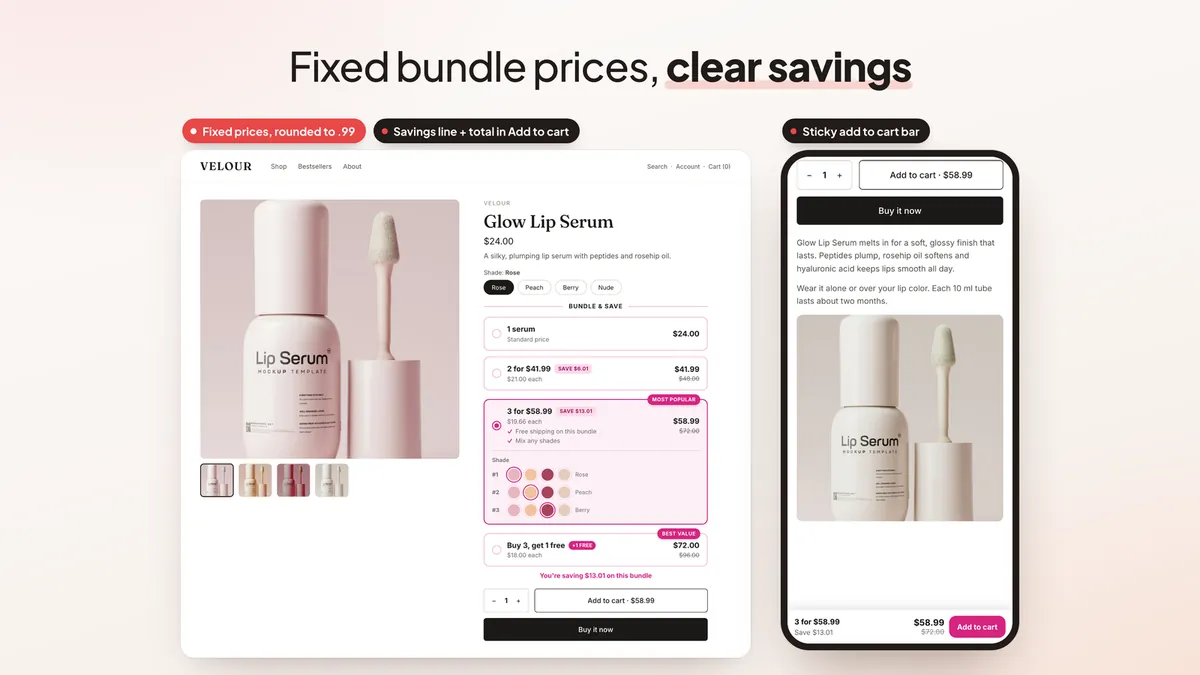
Quantity breaks work when shoppers can see the deal at a glance. The product page block now shows each tier as a clear bar, with a savings line under the bars and the total inside your theme's own Add to cart button. The theme button adds whatever bar the shopper picked, so there is no second button to confuse anyone.
- Fixed bundle prices. Set a price for the whole bar, such as 3 for $58.99, instead of a percentage. You can also round discounted prices to end in .99, .95 or .00.
- BOGO bars. Offer free units, such as "Buy 3, get 1 free", next to your normal tiers.
- Better variant picks. Shoppers choose a variant for each unit with a drop-down, pills, color swatches or picture buttons. The block can use the swatches you already set up in Shopify.
- Sold-out bars and bar images. A bar that can't be filled from stock can show as sold out, and each bar can have its own image.
- Free gifts shoppers choose. Add a free gift to any tier, or let shoppers pick their gift from a short list right in the selected bar.
Every text shoppers see can be translated per language. If you are new to pricing tiers, our bundle pricing guide walks through how to set them.
Mix & match and build-a-box
Some stores sell flavors, scents or shades where shoppers want variety, not three of the same thing. Two new options handle that.
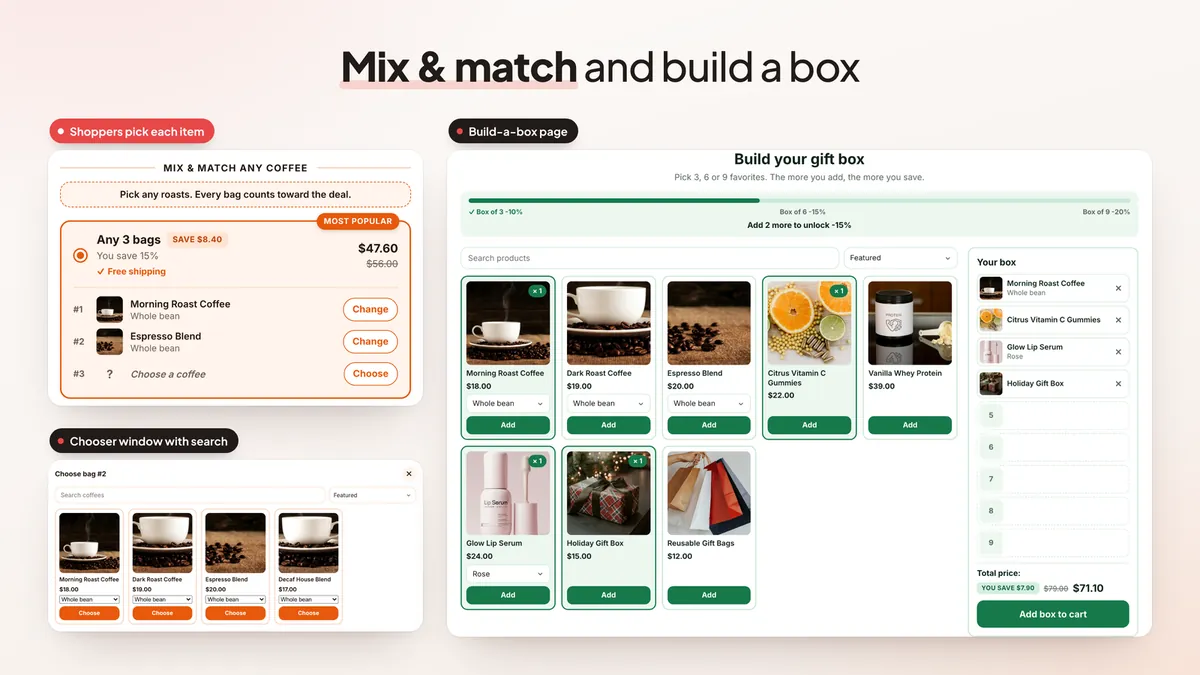
- Mix & match (Pro). Every product you target counts toward the same quantity break. Shoppers can pick each item from a chooser window with search and sorting, and you can require them to choose every item before they add to cart.
- Build-a-box page (Pro). Add the "Build a box" block to any page. Shoppers fill a box step by step, a progress bar shows the next deal ("Add 2 more to unlock..."), and the whole box goes to the cart in one click. You can add a gift message field too.
Gifts and free shipping on a mix & match tier count the whole mix, not just one product. For more ideas on what to bundle, see how to create product bundles on Shopify.
Free shipping, timers and gifts inside the bars
The easiest way to move shoppers to a bigger tier is to give the bigger tier a reason. These Pro options are off by default and you turn them on per offer.
- Free shipping on a bar (Pro). Mark a tier as "free shipping" and the app frees the cheapest shipping option at checkout once the cart holds that quantity.
- Countdown timer and low stock (Pro). Show a timer on the block, and a low stock note for variants Shopify tracks.
- Subscribe & save (Pro). Offer your pay-per-delivery subscription plans on each bar, priced at the plan price.
- Tick-to-add extras (Pro). Add checkboxes under the bars for extras like gift wrap or a matching item, added in the same click.
- Progressive gifts (Pro). Each bigger bar unlocks every smaller bar's gift too, with an "Unlock free gifts" row that shows what is locked and unlocked.
- Sticky add to cart bar (Pro). Keep the selected deal and its price on screen as shoppers scroll.
Our free gift with purchase guide covers how to pick gifts that pay for themselves.
Targeting, scheduling and testing
- Audience targeting (Pro). Show an offer by country, to B2B buyers, to new or returning customers, by customer tag, or only through a link. The rules apply to the checkout discount as well as the product page.
- Schedules (Pro). Give an offer start and end dates. Scheduled discounts now switch on and off at checkout on time, in your store's time zone.
- A/B tests with an automatic winner (Pro). Test prices, headings and bar styles on quantity breaks and bundles. Results show each version's chance to beat the original and revenue per view, and the app can keep the winner for you.
- One line in the cart (Pro). A bundle can show as a single cart line with its own name and total.
- Test mode (all plans). Check an offer through a preview link before shoppers see it.
- Analytics (Pro). A full analytics page, per-bar results, a comparison with the same days last month, and CSV export.
Need test ideas? Start with these upsell and cross-sell A/B test ideas.
Faster setup and a smarter admin
- Setup wizard. A five-step wizard walks you through offer type, products, discount, look and Go live, and checks that the app embed is on.
- Templates and a publish checklist. Start from templates, including seasonal ones such as Black Friday and gift sets. A checklist shows what each offer still needs before it goes live.
- AI assistant (Pro). In your admin, ask it to create or edit offers in plain words, and confirm each change before it saves. It is for you, not your shoppers.
- Bundle ideas from your orders (Pro). The app reads your recent orders and suggests products to bundle, which you can turn into an offer in one click.
- Bought together first (Pro). Recommendation offers can show the products your customers actually buy together before Shopify's own recommendations.
- Page builders. A placement option finds the Add to cart button on PageFly, GemPages, EComposer and Foxify pages.
- Your language. The admin is available in 32 languages, and money and numbers follow your admin language in your store currency.
Upsell popups, cart page offers and checkout or post-purchase offers are all still here, in the same app. See them all on the EA Bundles & Quantity Breaks page.
Plans and pricing
Free plan: one live offer at a time. That offer can be quantity breaks, a bundle, BOGO, an upsell popup or a cart offer, with the discount applied at checkout, free gifts, style presets, colors, test mode and basic views, add to carts and revenue.
Pro, $9.99 a month with a 7-day free trial: unlimited live offers, A/B tests with an automatic winner, targeting, schedules and popup rules, timers, low stock, effects and the sticky bar, mix & match and build-a-box, checkout and post-purchase offers, detailed analytics and CSV exports, and the AI assistant, custom CSS and fonts. The price is flat, with no revenue share.
Pro options are marked in the admin. If you turn one on while on the free plan, the app shows what Pro includes and lets you start the trial.
How to get started
- Install EA Bundles & Quantity Breaks from the Shopify App Store.
- Follow the setup wizard: pick quantity breaks, a bundle, a multi-pack or an upsell popup, then choose your products and discount.
- Pick a look from the presets and check the live preview.
- Make sure the app embed is turned on in your theme. The wizard's last step checks this for you.
- Click Go live, then open a product page to see the offer. Use test mode first if you want to check the discount at checkout.
For a wider plan to grow order value, read how to increase average order value on Shopify.
💡 Ready to put this into practice? Shopify's free 3-day trial — then $1/month for 3 months, plus 1% of sales back in credits — is long enough to set it up and see the numbers. Start your free trial → (affiliate link)
Frequently Asked Questions
Is EA Bundles & Quantity Breaks free?
Yes. The free plan runs one live offer at a time: quantity breaks, bundles, BOGO, an upsell popup or a cart offer, with the discount applied at checkout, free gifts, style presets and basic views, add to carts and revenue. Pro is a flat $9.99 a month with a 7-day free trial and unlocks unlimited live offers, A/B tests, targeting, mix & match, build-a-box, checkout and post-purchase offers, detailed analytics and the AI assistant. There is no revenue share.
What are quantity breaks?
Quantity breaks are volume discounts: the more units a shopper buys, the lower the price per unit. EA Bundles & Quantity Breaks shows them as selectable bars on the product page, and the theme's own Add to cart button adds the bar the shopper picked.
Can shoppers mix and match products in one deal?
Yes, on Pro. With mix & match, every product you target counts toward the same quantity break, and shoppers can pick each item from a chooser window with search and sorting. A build-a-box page block lets them fill a box step by step.
Can I test an offer before shoppers see it?
Yes, on every plan. Test mode shows the offer only through a preview link, so you can check prices and the checkout discount before it goes live.
Can a bundle show as one line in the cart?
Yes, on Pro. A bundle can appear as a single cart line with its own name and total, instead of one line per product.
Does it work with page builders?
Yes. A placement option finds the Add to cart button on pages built with PageFly, GemPages, EComposer and Foxify, and offer texts follow Weglot's translated pages.
Launch your first quantity break today
Install free, follow the setup wizard and have an offer live in a few minutes. See every feature and plan.
Install Free on Shopify