

Bundles, Quantity Breaks & Upsell Popups for Shopify
EA Bundles & Quantity Breaks sells more per order with quantity breaks, BOGO deals, fixed bundle prices, mix & match and build-a-box, plus free gifts shoppers can pick and upsell popups. The free plan runs one live offer; Pro unlocks every offer type for a flat $9.99 a month with no revenue share.
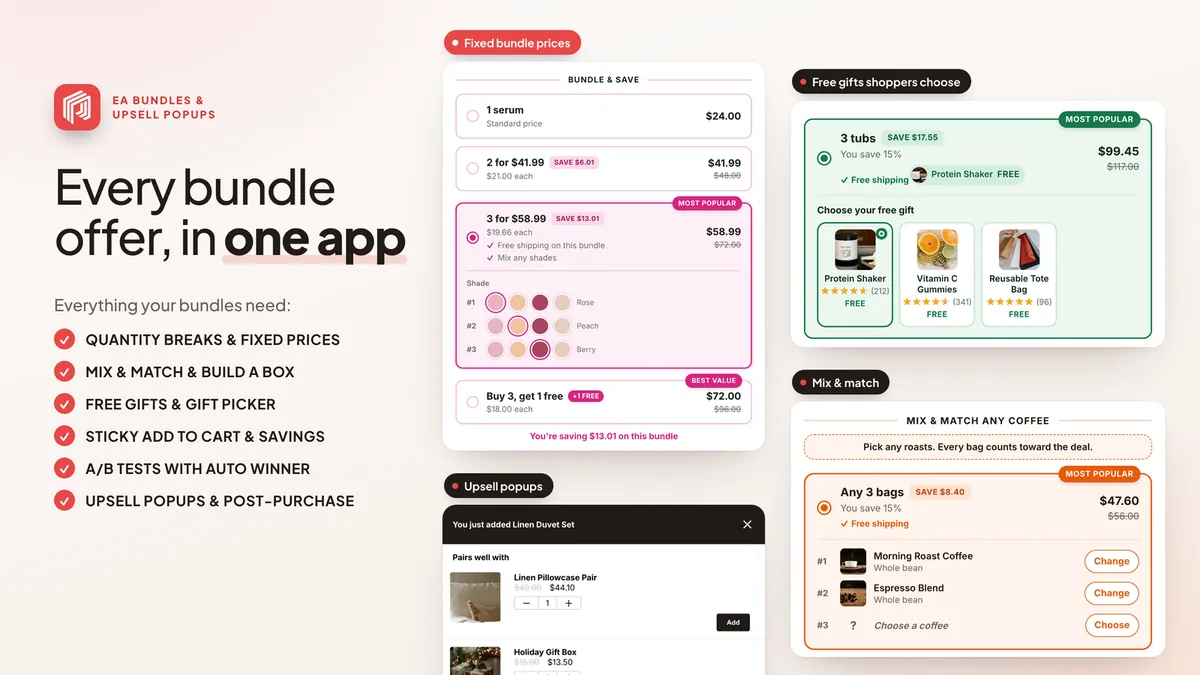
At a glance
| App Store name | EA Bundles & Quantity Breaks |
|---|---|
| Developer | EasyApps (EasyApps Ecommerce) |
| Price | Free plan (one live offer at a time); Pro $9.99/month with a 7-day free trial |
| Rating | 4.8/5 from 26 reviews on the Shopify App Store |
| Works with | Every Shopify theme, as an app embed (no theme code edits) |
| AI assistants | ChatGPT, Claude and Claude Code through the free EA Ecommerce Apps connector: ask for stats and ideas, and have the AI prepare quantity breaks, BOGO deals, multi-packs and bundles as drafts you can publish and undo · Install in ChatGPT |
What it does
Quantity breaks and BOGO
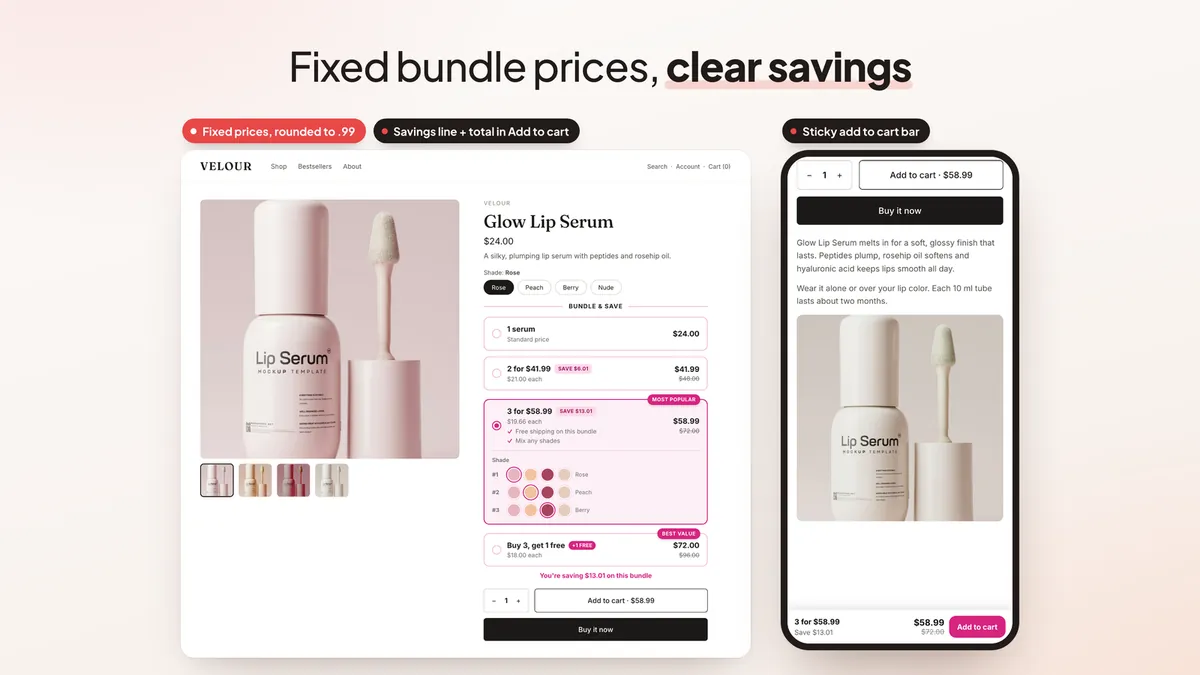
Volume discounts and buy-one-get-one bars on the product page, with a savings line and the total shown in your theme's Add to Cart.
Fixed bundle prices
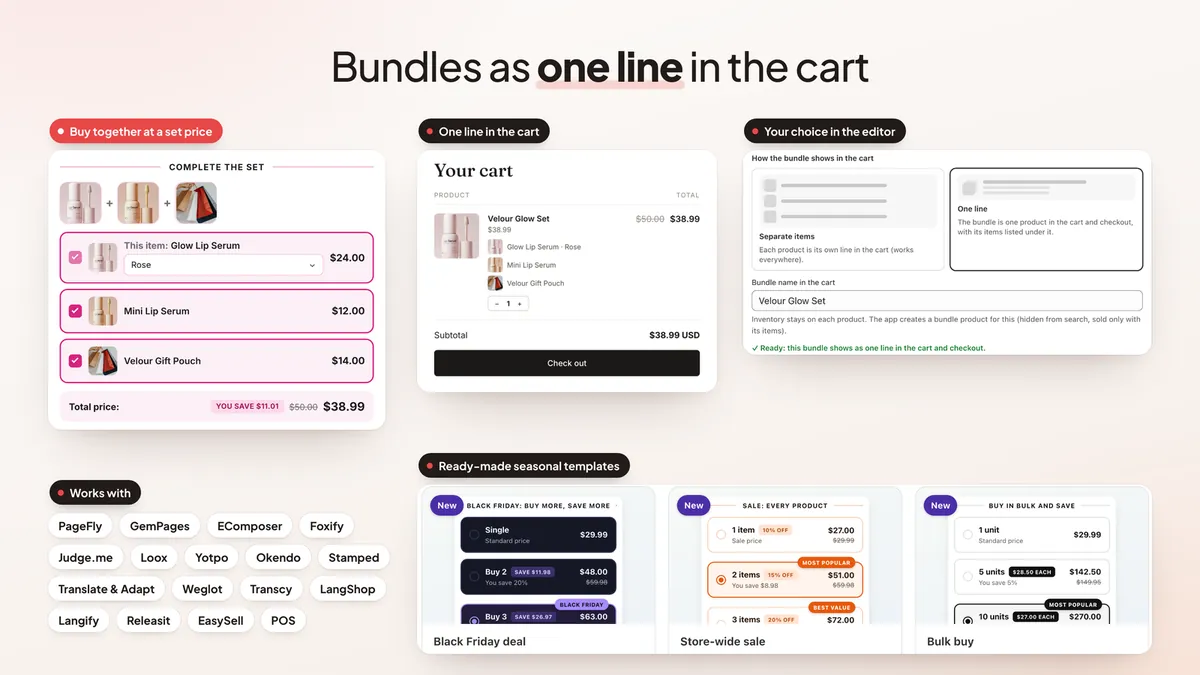
Set a bundle price, round it to .99 and show shoppers exactly what they save.
Mix & match and build-a-box
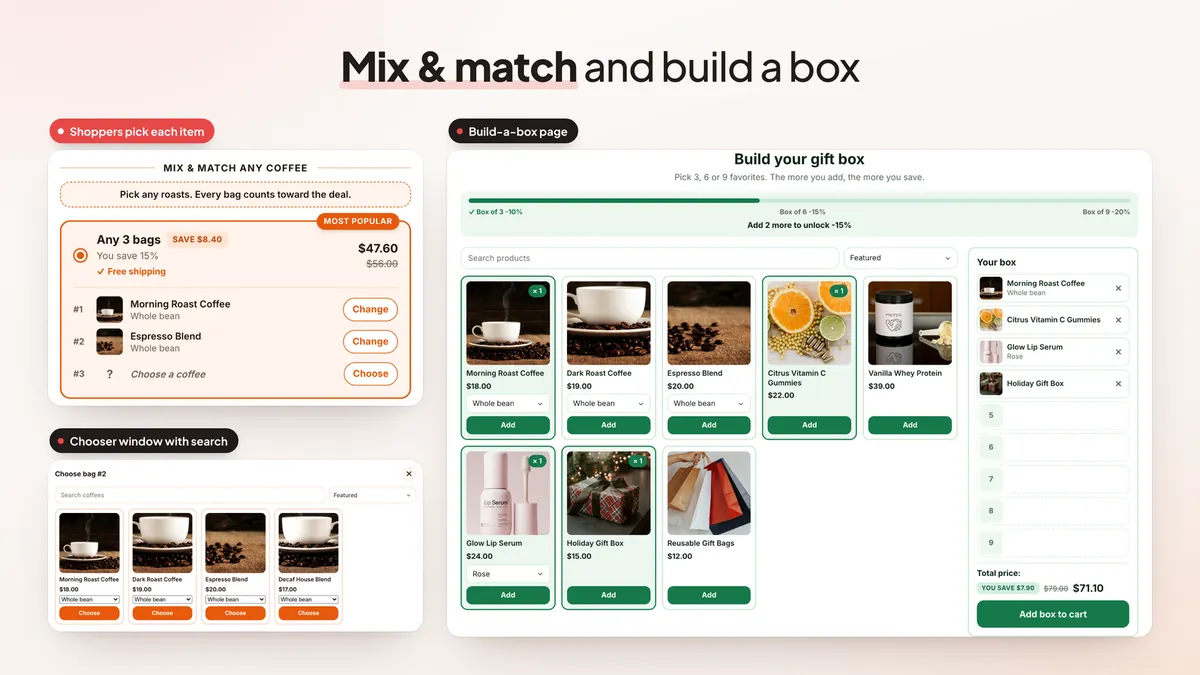
Let shoppers choose the items in a bundle, or fill a box step by step on its own page.
Free gifts and a gift picker
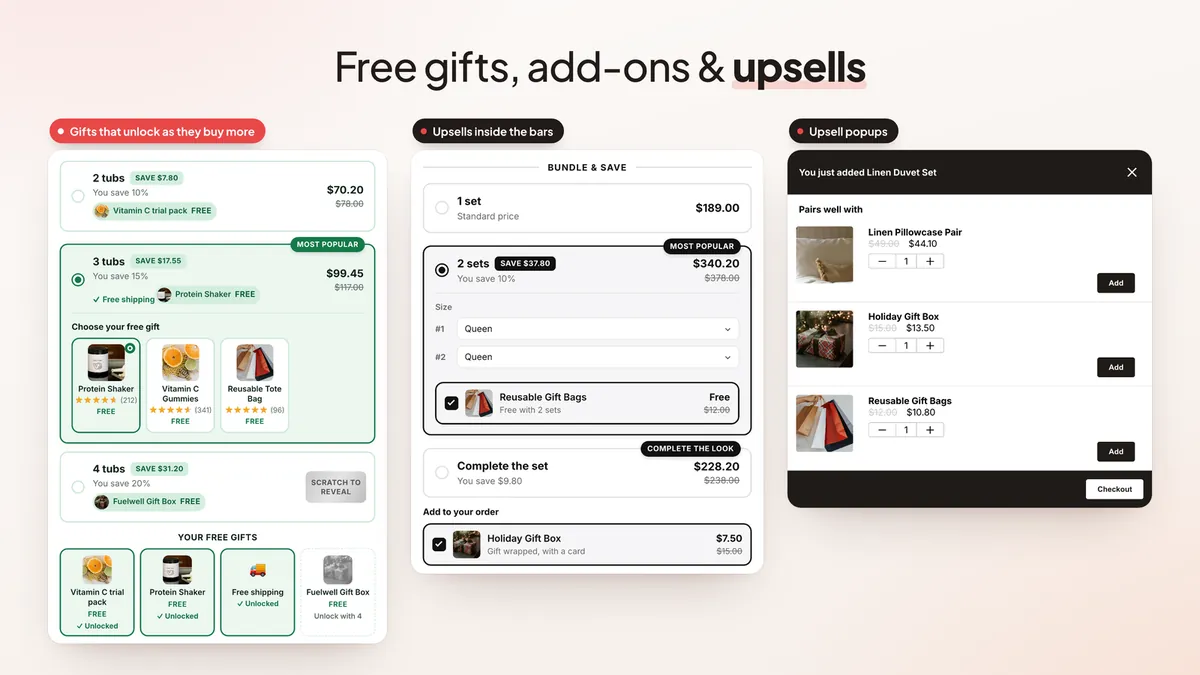
Add free gifts at each tier, let shoppers pick one with review stars, and add free shipping or upsells inside the bars.
Audience targeting
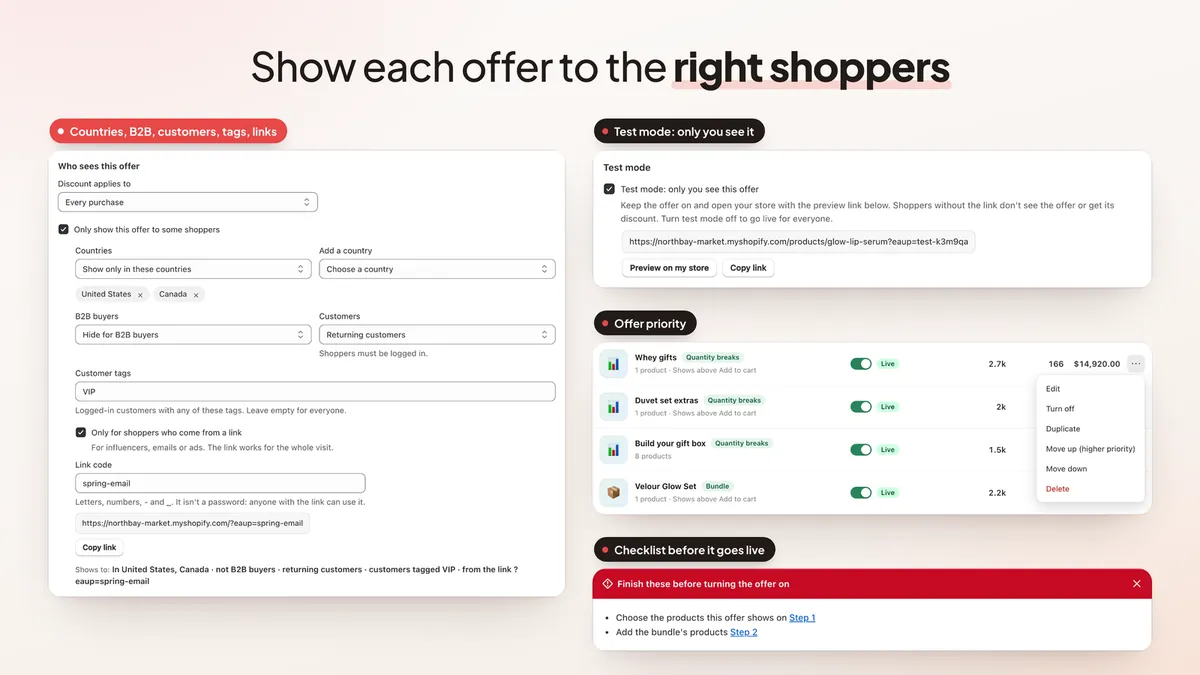
Show an offer by country, to B2B, new or returning customers, by customer tag or only through a link.
A/B tests with an automatic winner
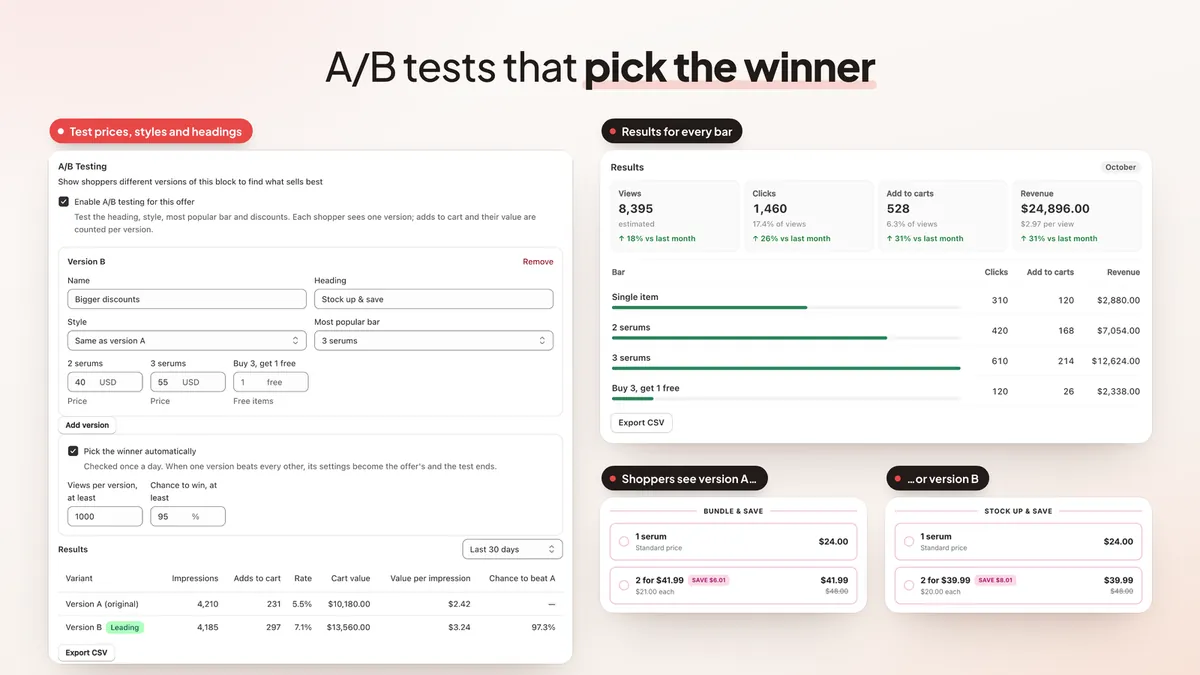
Test prices and headings; the app keeps the version that earns more per visitor.
One line in the cart
A bundle can appear as a single cart line, and every offer can be checked in test mode first.
Upsell popups and post-purchase offers
Add-to-cart upsell popups, plus checkout, thank-you page and post-purchase offers.
New in November 2026
- AI assistant does it all. Ask AI sets up any offer by name: products, collections, gift products, A/B tests, post-purchase funnels, custom CSS and History restore. How it works.
- Buy 2 → upgrade to Buy 3. A popup offers the next bar right after a shopper adds one, and one click upgrades them with the bigger discount and gift. Guide.
- Gifts for items added one by one. The gift arrives when the cart reaches the bar's quantity, with a choose-your-gift window over the cart drawer. Guide.
- Recommendation layouts. Product page recommendations as a grid, a swipeable row or a vertical list.
- Fast offer reordering. Drag offers or Move to top; the list order decides which offer shows first.
- Click the preview to edit. Click any part of the Live Preview to jump to its setting.
- Buy it now and Shop Pay carry the bundle. Express checkout buttons send the whole bundle, multi-pack or quantity break with its discount to checkout. How it works.
- Offer history. Undo a delete, restore deleted offers for 30 days, and take an offer back to an earlier version with History.
- Same quantity, different deal. Two bars can share a quantity with their own discounts; checkout applies the bar the shopper picked.
- Discount combinations per offer. Choose for each offer whether it combines with other product, order and shipping discounts.
- After-purchase targeting. Show post-purchase, checkout and thank-you offers to new customers, returning customers or tagged customers. Guide.
- Upgrade popups. An Add to cart popup can open only when a shopper adds a chosen tier and offer the next tier as a one-tap upgrade.
- Faster discounts on big carts. Large carts, including carts with free gifts, get their discounts with far less work.
See every update in What's new · Works with ChatGPT and Claude through the EA Ecommerce Apps connector, now in ChatGPT's plugin directory.
See it in action
Screenshots from the app and a sample store.
Plans & pricing
Free
$0
- 1 live offer at a time
- Quantity breaks, bundles, BOGO
- Upsell popups and cart offers
- Discounts applied at checkout
- Free gifts, style presets, colors
- Views, add to carts and revenue
Pro
$9.99/month
7-day free trial
- Unlimited live offers
- A/B tests with auto winner
- Targeting, schedules and popup rules
- Timers, low stock, effects, sticky bar
- Mix & match and build a box
- Checkout and post-purchase offers
- Detailed analytics and CSV exports
- AI assistant, custom CSS and fonts
Prices in USD, billed monthly through Shopify. Development stores are free.
Frequently asked questions
What are quantity breaks?
Quantity breaks are volume discounts: the more units a shopper buys, the lower the price per unit, for example 1 for $20, 2 for $36 and 3 for $48. EA Bundles & Quantity Breaks shows them as selectable bars on the product page.
Is EA Bundles & Quantity Breaks free?
Yes. The free plan runs one live offer at a time: quantity breaks, bundles, BOGO, upsell popups or cart offers, with discounts applied at checkout, free gifts and basic stats. Pro costs a flat $9.99 a month with a 7-day free trial and unlocks unlimited offers, A/B tests, targeting, mix & match, build-a-box, checkout and post-purchase offers, detailed analytics and the AI assistant. There is no revenue share.
Can a bundle show as one line in the cart?
Yes, on Pro. A bundle can be shown as a single line in the cart instead of one line per product.
Can I offer a free gift with a purchase?
Yes. Free gifts can be added at any tier, and shoppers can choose their gift from a picker.
Which apps does it work with?
It works with review apps such as Judge.me and Loox, Weglot for translations, and page builders such as PageFly, GemPages and EComposer.
Can I test an offer before shoppers see it?
Yes. Test mode shows the offer only through a preview link, so you can check prices and discounts before it goes live.
Do bundles work with Buy it now and Shop Pay?
Yes. When a shopper picks a bundle, multi-pack or quantity break and taps Buy it now, Shop Pay, Apple Pay, Google Pay or PayPal, the app adds the whole selection with its discount and opens the checkout. It is on for every store, free plan included, and you can turn it off in Settings › Express checkout buttons.
Can I restore a deleted offer?
Yes. Undo shows for 10 seconds after a delete, Offers › Recently deleted keeps deleted offers for 30 days, and History in the offer editor lets you take an offer back to an earlier saved version.
Can I show post-purchase offers only to returning customers?
Yes, on Pro. Post-purchase, checkout and thank-you offers can target everyone, new customers (first order), returning customers or customers with certain tags, in the offer editor under Advanced › Who sees this offer.
Can I manage EA Bundles & Quantity Breaks from ChatGPT or Claude?
Yes. Add the free EA Ecommerce Apps connector (https://mcp.easyappsecom.com/mcp) to ChatGPT, Claude or Claude Code and approve it in your Shopify admin. Your assistant can then read the app's stats and setup, suggest what to try next and prepare quantity breaks, BOGO deals, multi-packs and bundles as drafts. Every change starts as a draft with a preview: you publish it, or the AI does when you ask (if you allow that), and every change can be undone for 30 days. One connection covers all your EA apps, and no customer personal data goes through it. In ChatGPT, you can also install it from the plugin directory: EA Ecommerce Apps in ChatGPT.
Pair with other EasyApps
Setup playbook: How a Supplement Store Can Raise Order Value with Bundles and Upsells

Sticky Add to Cart Drawer
A slide cart drawer with upsells, a rewards bar and free gifts, plus a sticky add to cart bar and quick buy.

Rewards Bar & Free Gifts
A cart progress bar with up to 6 tiers of free gifts, free shipping and discounts, applied at checkout.

Free Shipping Bar & Upsell
A free shipping progress bar that creates the discount for you, plus reward goals, free gifts and upsells.

Email Popup & Spin Wheel
Email and SMS popups, spin the wheel, scratch card, Plinko and quiz popups with unique discount codes and A/B tests.
Guides, Tools & Resources
- 🤖 AI: Run Your Shopify Store's EA Apps from ChatGPT and Claude
- 🤖 AI: How to Manage Shopify Bundles and Quantity Breaks from ChatGPT or Claude
- 📊 Comparison: Best Quantity Break & Bundle Apps for Shopify
- 📖 Tutorial How to Add Upsells to Shopify
- 📖 Guide Shopify Upsell Strategies 2026
- 📖 Guide Shopify Cross-Sell Techniques
- 📖 Guide How to Increase AOV on Shopify
- 📖 Guide Upsell vs Cross-Sell: Which Drives More Revenue?
- 🔄 Alternative EA Bundles & Quantity Breaks vs ReConvert
- 🔄 Alternative EA Bundles & Quantity Breaks vs Bold Upsell
- 🔄 Alternative EA Bundles & Quantity Breaks vs Zipify OCU
- 🔄 Alternative EA Bundles & Quantity Breaks vs Candy Rack
- 🧮 Tool AOV Calculator