
What Claude can set up
- Campaign types: spin the wheel, email and SMS sign-up forms, scratch card, slot machine, Plinko, mystery gift and information popups.
- The offer: discount slices for a spin wheel, or one discount for everyone.
- Texts: headings, button text and the success message, in your store's voice.
- When and where: the trigger and the pages it shows on.
- Results: sign-ups and the rest of the numbers on the app's Analytics page.
How to create a popup with Claude
You need EA Email Popup & Spin Wheel on your store. It is free up to 1,000 store pageviews a month, and $99.99 a month for unlimited pageviews. Claude works on any plan.
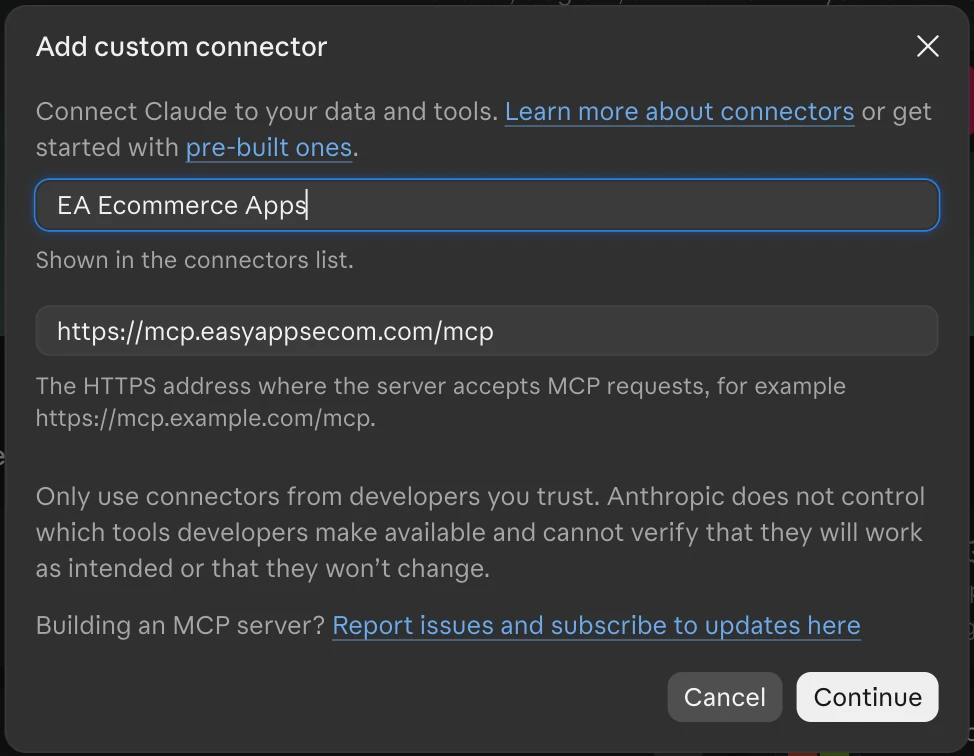
- Open Claude's connectors. In Claude, on any plan, open Customize › Connectors, click Add, then Add custom connector.
- Add EA Ecommerce Apps. Name it EA Ecommerce Apps, paste
https://mcp.easyappsecom.com/mcpand click Continue. - Sign in with your store. Click Connect (or the Connect button Claude shows in the chat the first time it needs your store) and pick one of your EA apps; with more than one store, type the store address first.
- Allow it in Shopify. Your Shopify admin opens that app's Connect to AI page. Check the store and the access, then click Allow.
- Describe your popup. In a new chat, ask for the campaign, for example: "Make a Black Friday spin wheel, 10/15/20% off."
- Check the preview card. The card shows the popup's texts, the offer, the trigger and the pages it shows on.
- Publish. Click Publish on the card, or ask Claude to publish it. Open in admin lets you adjust the design in the campaign editor first.
Prompts to start from
- "Make a Black Friday spin wheel, 10/15/20% off, shown after 5 seconds on every page."
- "Create an email popup that offers 10% off the first order, only on product pages."
- "Make an information popup about our holiday shipping dates on the shipping page."
- "How many sign-ups did my popups get last month?"
- "Change the heading of my live spin wheel to Spin for your holiday gift."
Review and publish
- Drafts first. Everything the AI prepares starts as a draft with a preview card showing what shoppers will see.
- You choose who publishes. Publish a draft yourself with one click, or leave "Let the AI publish changes for me" ticked when you approve the connection. Then the AI publishes only when you ask it in the chat, and your AI tool asks you to confirm. You can turn AI publishing off for a store at any time.
- Every change can be undone. Publishes and deletes can be undone for 30 days from the card, the chat or your Shopify admin.
- Nothing lost silently. Edits made in the app meanwhile are kept; if the same setting changed, the AI asks before overwriting it.
- No customer personal data. Only totals and settings go through the connector; customer names, emails, phone numbers and addresses never do.
- Every change is recorded on the Connect to AI page of each EA app, with who asked and which AI tool, next to a Disconnect button.
Changes to a live campaign also show in the campaign editor as a "Review AI changes" banner, where Review changes loads them and Save publishes them.
Frequently Asked Questions
Can Claude create a popup in my Shopify store?
Yes, with EA Email Popup & Spin Wheel and the EA Ecommerce Apps connector. Claude prepares the campaign as a draft with a preview card, and it goes live when you publish it, or when you ask Claude to and AI publishing is allowed.
Which Shopify popup apps work with Claude?
EA Email Popup & Spin Wheel works with ChatGPT, Claude and Claude Code through the EA Ecommerce Apps connector, together with the other EA Apps on your store.
Can Claude make a spin the wheel popup?
Yes. Ask for a spin wheel with the discounts you want on the slices. Claude can also make email and SMS forms, scratch cards, slot machines, Plinko, mystery gift and information popups.
Will the popup go live by itself?
No. The AI only publishes when you ask it in the chat and AI publishing is allowed for your store; otherwise you publish with your own click. Every publish can be undone for 30 days.
Does Claude see my subscribers' emails?
No. The connector returns totals such as sign-ups, never subscribers' names, emails or phone numbers.
What does it cost?
The connector is free, and works on any Claude plan. EA Email Popup & Spin Wheel is free up to 1,000 store pageviews a month, and $99.99 a month for unlimited pageviews.
Let Claude draft your next popup
Install EA Email Popup & Spin Wheel, add the EA Ecommerce Apps connector and describe your campaign.
Install Free on Shopify